AI Crawler Analytics: A Practical Guide

AI crawlers are now part of everyday web traffic, but most teams still read them the wrong way. A spike from GPTBot, ClaudeBot, OAI-SearchBot, or another AI crawler can look exciting, alarming, or commercially meaningful. On its own, it is none of those things. It is a request in a log.
That is why AI crawler analytics matters. It helps SEO, content, and web teams separate real bot access from spoofed traffic, infrastructure noise, and answer-level visibility.
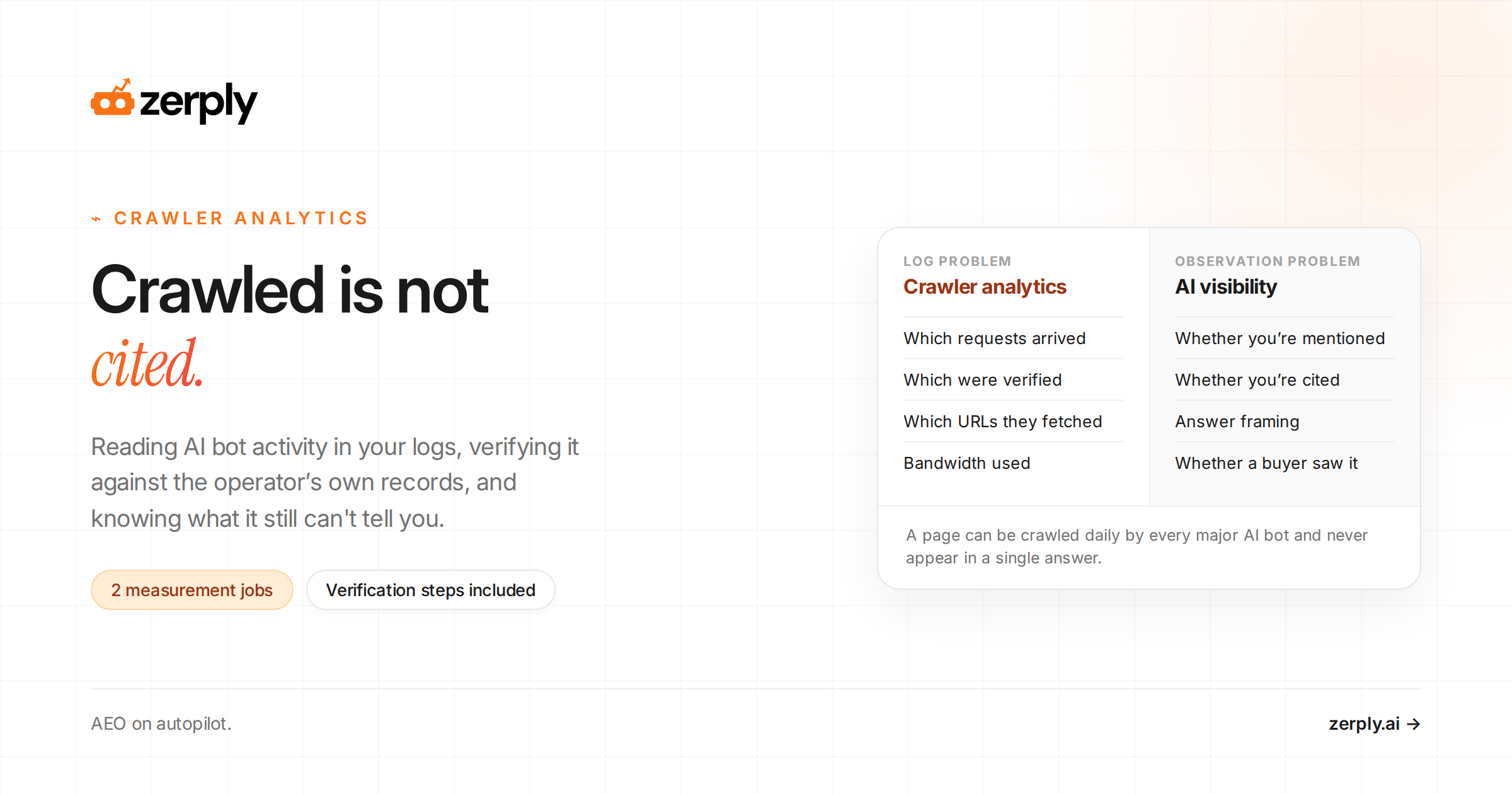
Managing automated access to your site is a log problem, answered in server and CDN data. Knowing whether your brand appears in AI answers is an observation problem, answered by running prompts and reading the responses.
A page can be crawled every day by major AI bots and never appear in a single answer. The practical job is to know what reached your site, what you allowed, what you blocked, and what you still need to measure somewhere else.
What is AI crawler analytics?
AI crawler analytics is the practice of examining requests from an AI crawler, an automated program associated with an AI provider or AI-related service that requests pages from the web. The work happens in a server log, a record of requests handled by a web server, or in CDN and bot-management data.
The goal is practical. You want to know:
- Which requests arrived
- Which were verified
- Which URLs they fetched
- How much bandwidth they used
- Whether your access rules worked
A user agent is the request header that identifies a client. It is a useful starting point for classification, but proof of identity comes from verification.
A crawler request is an access signal. AI visibility measures whether a brand appears in relevant generated answers. The related idea of agentic SEO focuses on preparing a site for AI-driven discovery and action.
Where can teams find AI crawler data?
AI crawler data lives in three places: origin server logs, CDN logs, and bot-management platforms. Start with whichever sees the request first. Origin server logs offer the most detailed raw record.
If you're using Zerply, we automatically fetch the server logs data from Cloudflare, Vercel or any of the other CDN provider for you.
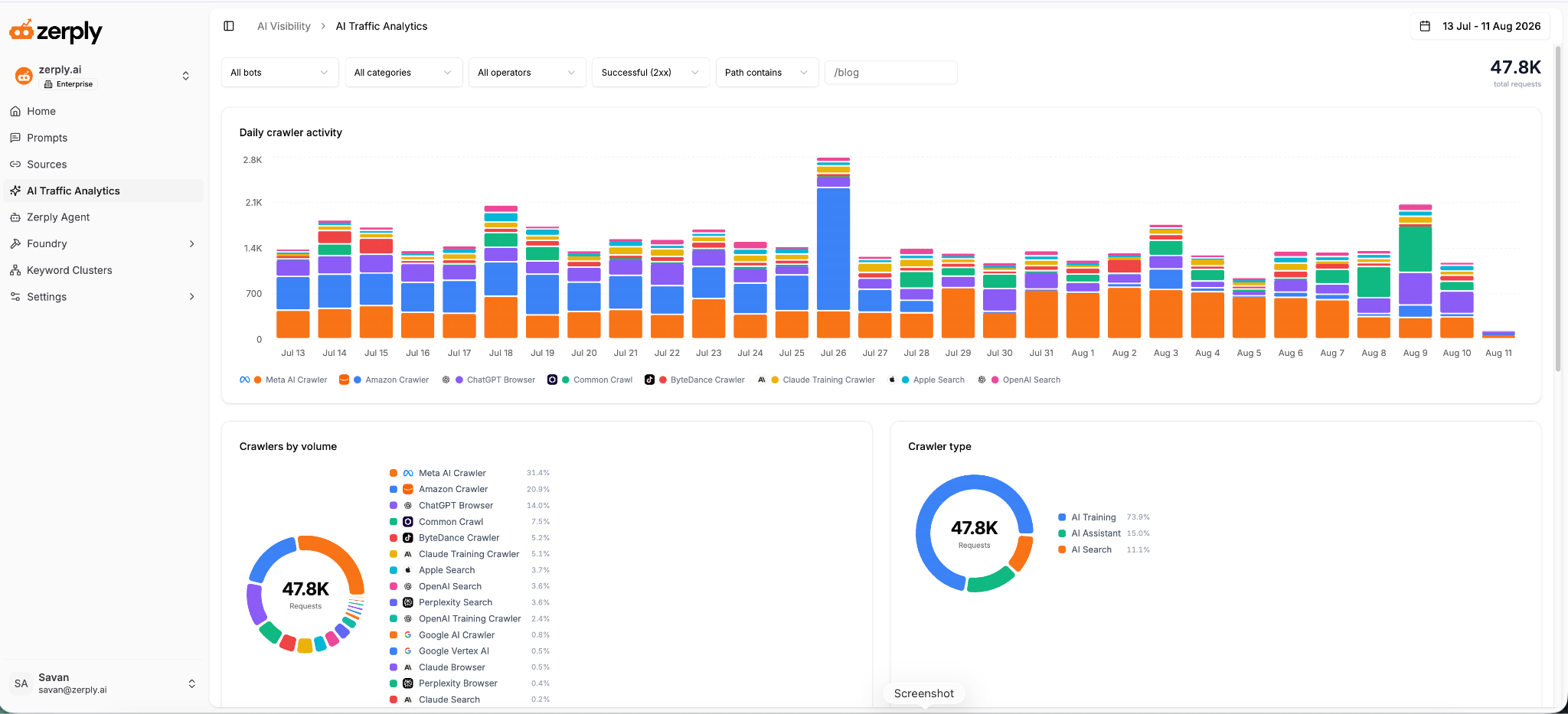
CDN logs show requests stopped, cached, or rate-limited at the edge. Bot-management platforms add classifications, verification status, and rule actions that help teams separate documented bots from suspicious automation.
Keep the timestamp, request path, source IP, user-agent value, HTTP status, response bytes, cache result, and bot classification. Those fields let you measure AI bot traffic without guessing from a dashboard total.
| Metric | Example value | Why it matters |
|---|---|---|
| Verified bots | 4 | Shows how many documented crawlers reached the site during the period. |
| Verified requests | 1,248 | Quantifies the volume of validated crawler traffic. |
| Bandwidth | 84 MB | Helps assess infrastructure impact. |
| Top crawler | GPTBot | Surfaces which documented bot made the most requests. |
| Repeated path needing review | /pricing |
Helps spot loops, cache misses, or pages worth protecting. |
This table is an illustrative reporting model for fields a team might review in a server-log, CDN-log, or bot-management dashboard.
See how your brand shows up in AI search
Track visibility, citations, prompts, and competitors across leading AI platforms.
How do you build a reliable AI crawler methodology?
A reliable methodology has three parts: a known-bot list from current official documentation, a verification step for every request, and a written record of what you decided and when. Validation belongs in the first pass before any reporting or policy change.
Start with current operator documentation. OpenAI documents OAI-SearchBot, GPTBot, and ChatGPT-User in its crawler documentation. Google explains crawler categories, common crawler tokens such as GoogleOther and Google-Extended, user-triggered fetchers such as Google-Agent, and supported verification options in its crawler documentation.
Anthropic covers ClaudeBot, Claude-User, and Claude-SearchBot in its crawler guidance. Perplexity documents PerplexityBot and Perplexity-User in its crawler guide. Cloudflare explains platform-side verification in its verified bot documentation.
A verified bot is a request you have confirmed using supported evidence such as an operator’s IP range, reverse DNS with forward confirmation, which means looking up the hostname behind the IP and then checking that hostname resolves back to the same IP, cryptographic bot authentication, or a trusted bot-management classification. If no supported method exists, label the request unverified. Do not make access or reporting decisions from the header alone.
Which AI crawlers should you track?
Track the operators whose bots appear most often in your logs and who publish a supported verification method. Purpose labels below follow current operator documentation.
| Crawler name | Operator | Declared purpose | robots.txt control | What the visit can and cannot indicate |
|---|---|---|---|---|
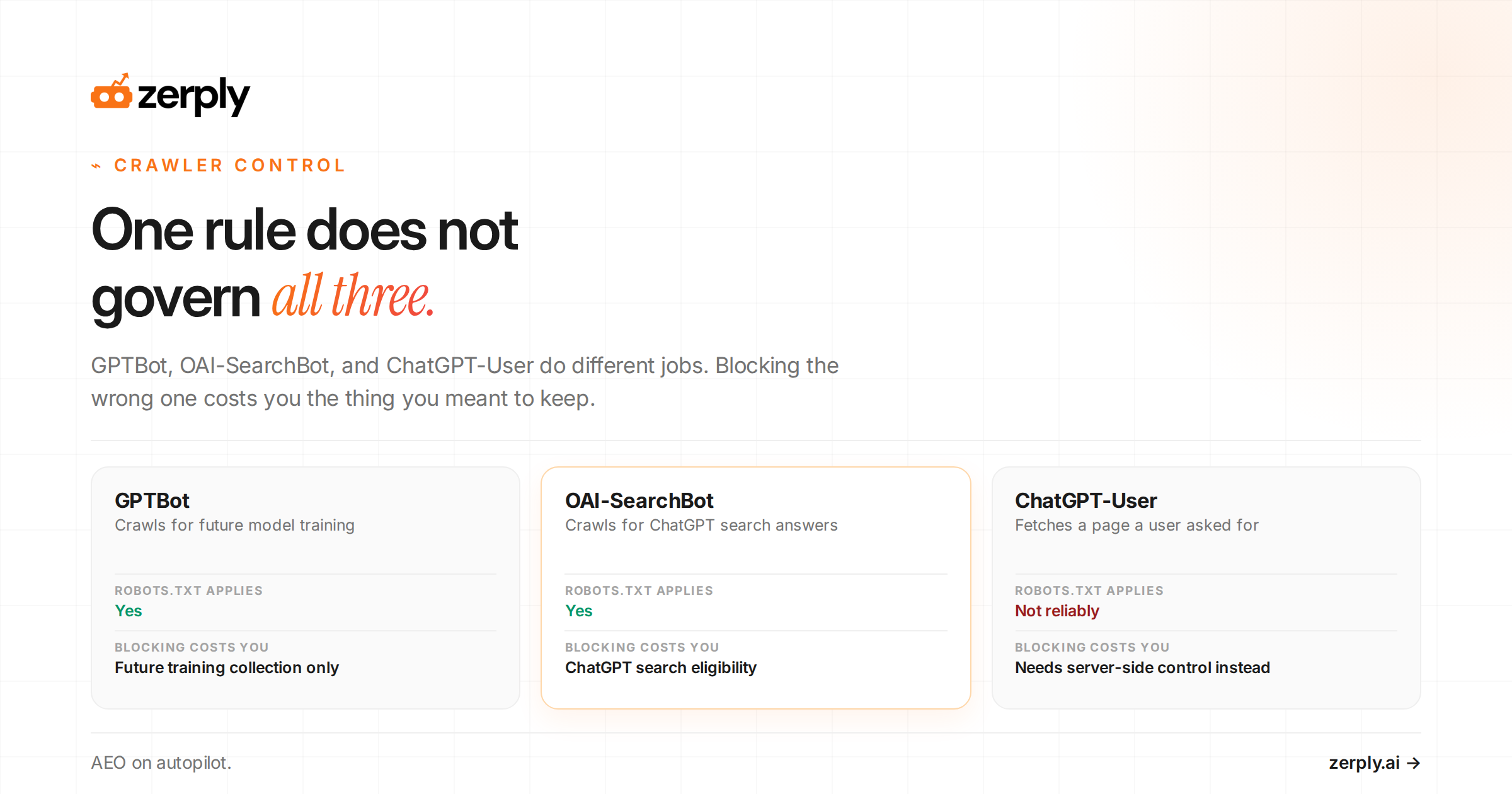
| OAI-SearchBot | OpenAI | Surface sites in ChatGPT search features | Yes | Can indicate a verified search-related fetch. Cannot prove an answer mention or citation. |
| GPTBot | OpenAI | Crawl content that may be used for generative AI foundation-model training | Yes | Can indicate a verified request under this declared purpose. Cannot prove retention or training use. |
| ChatGPT-User | OpenAI | Fetch pages for certain user actions in ChatGPT and Custom GPTs | User-initiated caveat: OpenAI says robots.txt may not apply | Can indicate a user-directed fetch. Cannot prove a customer saw the result. |
| GoogleOther | Generic crawl used by various Google product teams | Yes | Can indicate a verified generic Google crawl. Cannot identify one specific product outcome. | |
| Google-Extended | robots.txt control token for Gemini training and grounding, not a crawler that appears as traffic | Yes | Can show your stated preference, not a distinct request, crawler visit, or model use. | |
| Google-Agent | User-triggered fetcher used by Google agents hosted on Google infrastructure | Generally ignores robots.txt because the fetch is user-triggered | Can indicate a user-requested fetch from Google infrastructure. Cannot prove search inclusion. | |
| ClaudeBot | Anthropic | Collect web content that could contribute to training | Yes | Can indicate a verified request. Cannot prove dataset inclusion or training use. |
| Claude-User | Anthropic | Retrieve content at a user's direction | Yes | Can indicate a user-directed fetch. Cannot prove a customer saw the result. |
| Claude-SearchBot | Anthropic | Improve the relevance and accuracy of search responses | Yes | Can indicate a verified search-related fetch. Cannot prove a citation or answer inclusion. |
| PerplexityBot | Perplexity | Surface and link websites in Perplexity search results | Yes | Can indicate a verified search-related fetch. Cannot prove an answer mention or citation. |
| Perplexity-User | Perplexity | Fetch pages to help answer a user question and include a link in the response | User-initiated caveat: generally ignores robots.txt | Can indicate a user-directed fetch. Cannot prove a customer saw the result. |
| Unknown automated traffic | Unknown | Not established | Varies | Can show automation reached the site. It cannot be assigned to an AI operator or purpose. |
Use the table as a working inventory, not as permanent policy. Operators can change bot names, declared purposes, verification methods, and access consequences. Refresh your known-bot list before any reporting cycle or robots.txt change.
Is ChatGPT recommending your competitors instead of you?
See where your brand appears, who is winning visibility, and what you can do about it.
What does the AI crawler request path look like?
A request moves through five stages:
- The log that captures it
- Verification
- The dashboard that summarizes it
- A human interpretation layer
- An action
This path preserves the difference between raw access data and a decision.
This plain-text architecture diagram below shows an AI crawler request moving through CDN or server logs, bot verification, an analytics dashboard, an interpretation layer, and an action layer.
flowchart LR
  A[AI crawler request] --> B[CDN or server log]
  B --> C[Bot verification]
  C --> D[Analytics dashboard]
  D --> E[Interpretation layer]
  E --> F[Action: allow, limit, block, or review]
What does AI crawler traffic tell you?
Crawler traffic tells you which verified bots reached your site, what they asked for, how hard they hit your infrastructure, and whether your access rules worked. It tells you nothing about answer presence. A crawl rate is the volume of requests a crawler makes during a chosen period. Read it alongside unique requested URLs, bandwidth, response codes, request intervals, and repeated paths.
Use a simple workflow. Choose the data source and time zone. Build your known-bot list. Separate verified bots from suspicious traffic. Measure requests and requested URLs. Inspect 2xx, 3xx, 4xx, and 5xx patterns. Compare week-over-week trends. Then review robots.txt and CDN rules before you change access.
Illustrative example: The fictional SaaS site below uses weekly logs after validation. Use it as a reporting model.
| Crawler | Requests | Pages requested | Status-code distribution | Bandwidth | Recommended action |
|---|---|---|---|---|---|
| OAI-SearchBot, verified | 420 | 188 | 200: 399, 304: 18, 404: 3 | 31 MB | Check important pages return 200 and keep the current documented policy. |
| GPTBot, verified | 1,180 | 640 | 200: 1,120, 304: 42, 429: 18 | 86 MB | Review the training-access policy and rate-limit setting with the content and web owners. |
| Claude-SearchBot, verified | 210 | 126 | 200: 201, 301: 8, 404: 1 | 14 MB | Fix the repeated redirect path if it is not intentional. |
| Claimed AI bot, unverified | 2,900 | 2,760 | 200: 1,760, 403: 1,100, 404: 40 | 240 MB | Keep blocked, investigate IPs and paths, and do not report it as a named AI crawler. |
In this example, GPTBot made the most requests. The strongest operational signal may still be the unverified traffic because it needs a security decision.
There is no published normal baseline for AI crawler volume. Request levels scale with site size, page count, update frequency, and link profile, so the useful comparison is your own site week over week rather than someone else's numbers. Investigate when your verified trend changes sharply, 5xx rates climb, 429 responses appear where they did not before, or volume shifts between bots after a policy change.
What can crawler data not tell you?
Server-log evidence can confirm that a request reached your site. It cannot prove that content was retained, used for model training, surfaced in an answer, cited by an AI platform, or seen by a prospective customer. It also cannot prove lead quality, pipeline, or revenue.
It does not measure AI referral traffic, which is a visit to your site that arrives from an AI product or AI-driven search experience. Referral traffic needs web analytics and referral-source data. Even then, it measures a visit, not whether your brand was cited in every answer.
To measure mentions, citations, context, sentiment, and competitor presence, use a separate AI visibility audit and answer-level tracking. For the next layer of measurement, read our guides on measuring brand visibility in LLM-powered search and monitoring competitor visibility across AI answer engines.
How should teams manage AI crawlers?
Teams should manage AI crawlers with a written policy for each documented bot category, plus separate controls for rate limiting and abuse. A robots.txt file is a site-level file that gives crawl directives to compatible automated clients. Compliant clients respect it. Anything else requires CDN or WAF enforcement.
Review the current official documentation before changing rules. Some providers use separate bots for training, search, and user-directed retrieval. A single block can affect a different use case than the one you meant to control. Pair robots.txt decisions with CDN or WAF rules when you need to manage rate, abuse, or unverified traffic.
Make your brand more visible in AI search
Understand where you appear, where competitors win, and what to improve next.
Why would a team block one OpenAI bot and allow another?
A common pattern is to block GPTBot while allowing OAI-SearchBot. OpenAI documents GPTBot as the training crawler and OAI-SearchBot as search-related. Its documentation also says sites opted out of OAI-SearchBot will not appear in ChatGPT search answers, though they can still appear as navigational links. That makes the split decision practical: a team can decline training access without giving up ChatGPT search presence.
Other operators publish different consequences. Anthropic says disabling Claude-User can reduce visibility for user-directed web search, and disabling Claude-SearchBot can reduce visibility and accuracy in user search results.
Google does not publish the same kind of search-answer consequence for Google-Agent because it is a user-triggered fetcher that generally ignores robots.txt. Google states that Google-Extended controls Gemini training and grounding preferences without affecting Google Search inclusion or ranking signals.
The ChatGPT-User row in the table is the important caveat. Because those requests are user-initiated, OpenAI says robots.txt rules may not apply. That means you also need to think about other policy surfaces when the fetch is happening on a user's behalf.
Here is an illustrative policy pattern.
# Illustrative policy only. Confirm current vendor guidance before deployment.
User-agent: GPTBot
Disallow: /

User-agent: OAI-SearchBot
Allow: /
Keep a decision register with the bot, policy, owner, reason, evidence source, approval date, and review date. That record makes changes reversible and auditable.
How often should you review AI crawler activity?
Review verified and suspicious AI bot traffic weekly if your site changes often, runs campaigns, or has tight infrastructure limits. Review sooner after a traffic spike, 5xx increase, ruleset change, or published crawler-policy update. Run a monthly policy check to confirm documentation, robots.txt rules, and CDN controls still match your decision register.
Bring the same reporting cadence to technical and content stakeholders. The web team can assess load and access, while the content team can compare policy changes against a separate answer-level visibility report.
Conclusion
AI crawler analytics is a technical access signal. It helps teams validate AI bot traffic, protect site resources, and make deliberate access decisions.
It is still only one side of the picture. To understand whether crawler access turns into actual brand presence in AI answers, teams need answer-level visibility data as well.
If you want a simpler way to monitor where your brand shows up in AI-generated answers alongside your broader SEO workflow, Zerply is a practical place to start.
See how your brand shows up in AI search
Track visibility, citations, prompts, and competitors across leading AI platforms.
Frequently asked questions
How can you verify an AI crawler?
Do not rely on the user-agent header alone. Check current operator documentation, then use supported IP-range checks, reverse DNS with forward confirmation, which means looking up the hostname behind the IP and then checking that hostname resolves back to the same IP, cryptographic bot authentication, or a trusted bot-management classification. Label traffic unverified when those checks are unavailable or fail.
Should you block AI crawlers in robots.txt?
Make a bot-by-bot policy decision based on the crawler’s documented purpose, your content policy, infrastructure limits, and current provider guidance. Some providers separate training, search, and user-directed retrieval, so blocking one bot can affect a different use case from another.
Does AI crawler traffic prove AI visibility?
No. A verified crawler request proves that the request reached your site. It does not prove that content was retained, used for training, included in an answer, cited, or seen by a customer. Measure mentions, citations, context, sentiment, and competitor presence with answer-level AI visibility tracking.
Written by
Founder, Zerply.ai & Wittypen
Preetesh Jain is the Founder of Zerply.ai and Wittypen. He specializes in SEO, Answer Engine Optimization (AEO), AI search visibility, content marketing, and product development. Through his work building AI-powered marketing platforms, he helps businesses improve their organic presence across Google, ChatGPT, Perplexity, Claude, and other emerging discovery channels. He regularly writes about AI search, organic growth, content strategy, and the future of digital marketing.