Introducing Citation Decay

When someone asks ChatGPT, Claude, Perplexity, or Google AI Mode a question, those products often name websites as sources. If one of those sites is yours, you have a citation: the model used your page when writing the answer. Those mentions help, and they fade.
A page can be the source ChatGPT leans on in January and gone by March, replaced by a competitor or by another URL of yours. Most teams only notice after the replacement is already sitting in the answer.
The problem
Zerply already shows which of your pages show up as sources in AI answers. That list is true on the day you open it. It does not tell you whether those pages are still getting cited, or whether it is time to update them.
A lot of teams treat this like a content calendar: refresh the oldest posts first. How old a post is does not tell you whether ChatGPT still uses it. One guide can keep getting cited for months. Another peaks in a few weeks and then drops off before anyone has scheduled a rewrite.
When the backlog never clears, you guess. You spend a week on a page that is still gaining citations, and miss the one that already lost those questions to someone else.
What's new
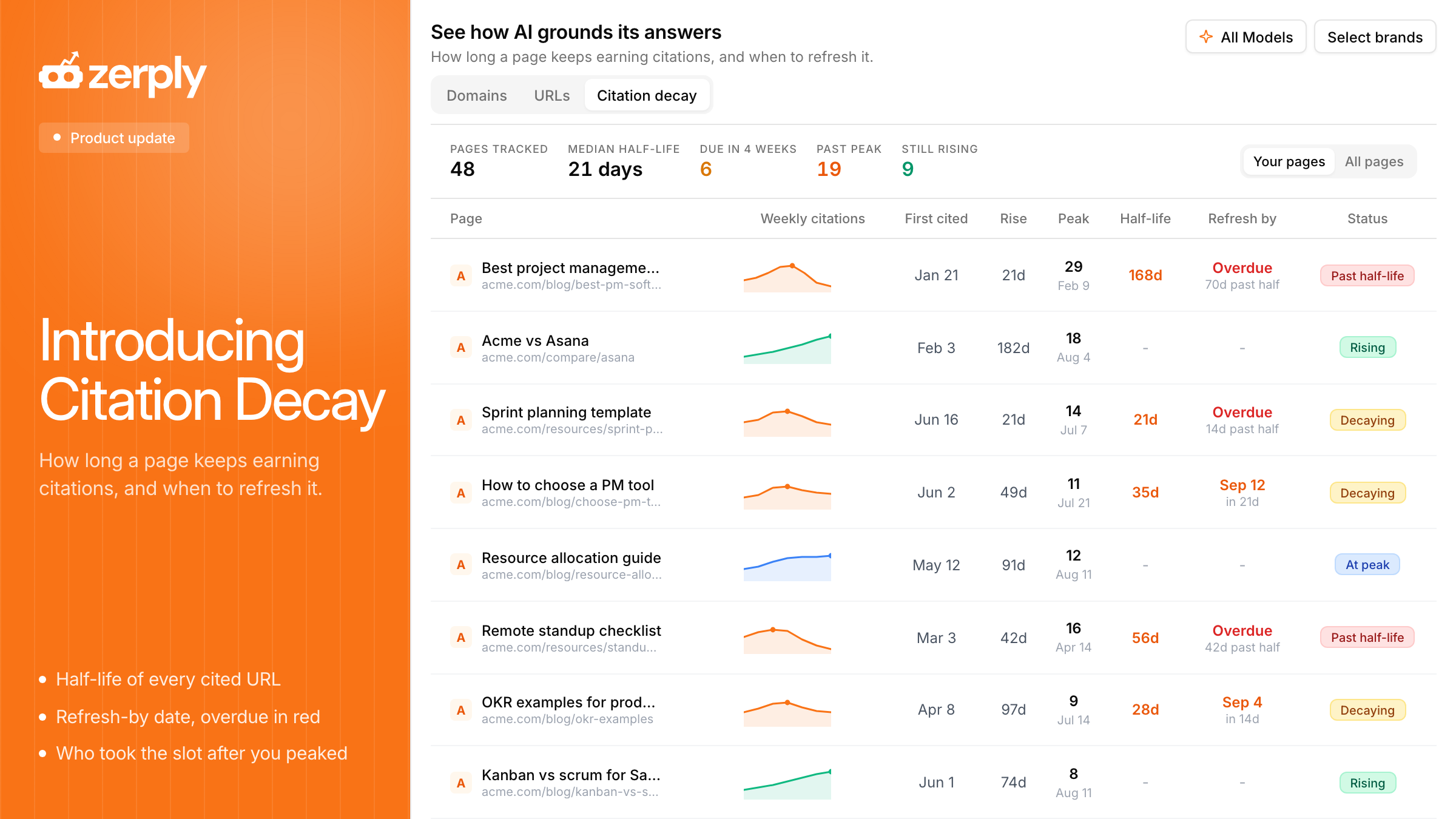
Citation Decay has now landed in Zerply. For every page that has been cited in AI answers, it shows how those citations changed over time, and a suggested date to refresh the page.
Each row has a small weekly chart, the date the page was first cited, how long it rose, when it peaked, and how long after that peak it took to fall to about half as many citations. We call that last number half-life. Each page also has a status: Rising, At peak, Decaying, Past half-life, or Low volume. If a refresh date is overdue, it shows in red.
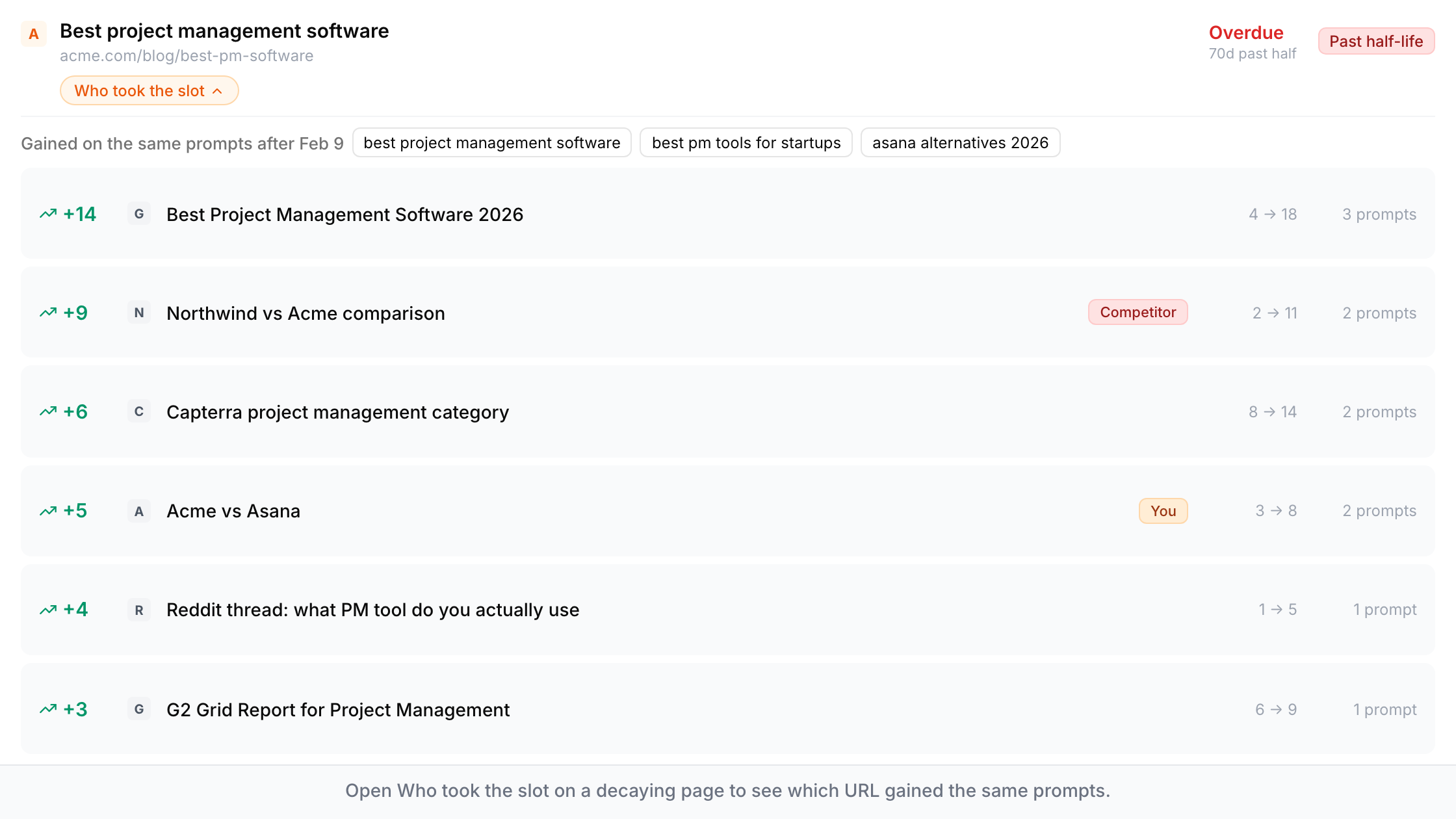
If a page is decaying or past half-life, open Who took the slot. That panel lists the URLs that started gaining citations on the same questions after yours peaked, and marks them as you or a competitor.
What you can do now
- Put a refresh on the calendar for pages that are actually losing citations, instead of updating by publish date.
- Leave still-rising pages alone for now, and spend the time on pages that are already past half-life.
- When a page is fading, see which URL took those questions, so you know whether you are losing to a competitor or to another page on your own site.
- If your Claude or ChatGPT is already connected to Zerply MCP, ask the same thing there: which cited pages are fading, and what replaced them.
You can filter by model and brand the same way as the rest of Sources. Switch between Your pages and All pages if you want to watch competitor URLs on the same timeline.
This view needs history. Curves show up once a page has been cited across several weeks. Half-life only appears when the peak was high enough to mean something. If a row is empty, there are not enough weeks of citations to chart yet.
Try it now
Open Citation Decay in your workspace. Go to AI Visibility, then Sources, then Citation decay. You can also access it via our MCP on Claude, ChatGPT or any platform of our choice.
Written by
Founder, Zerply.ai & Wittypen
Preetesh Jain is the Founder of Zerply.ai and Wittypen. He specializes in SEO, Answer Engine Optimization (AEO), AI search visibility, content marketing, and product development. Through his work building AI-powered marketing platforms, he helps businesses improve their organic presence across Google, ChatGPT, Perplexity, Claude, and other emerging discovery channels. He regularly writes about AI search, organic growth, content strategy, and the future of digital marketing.