
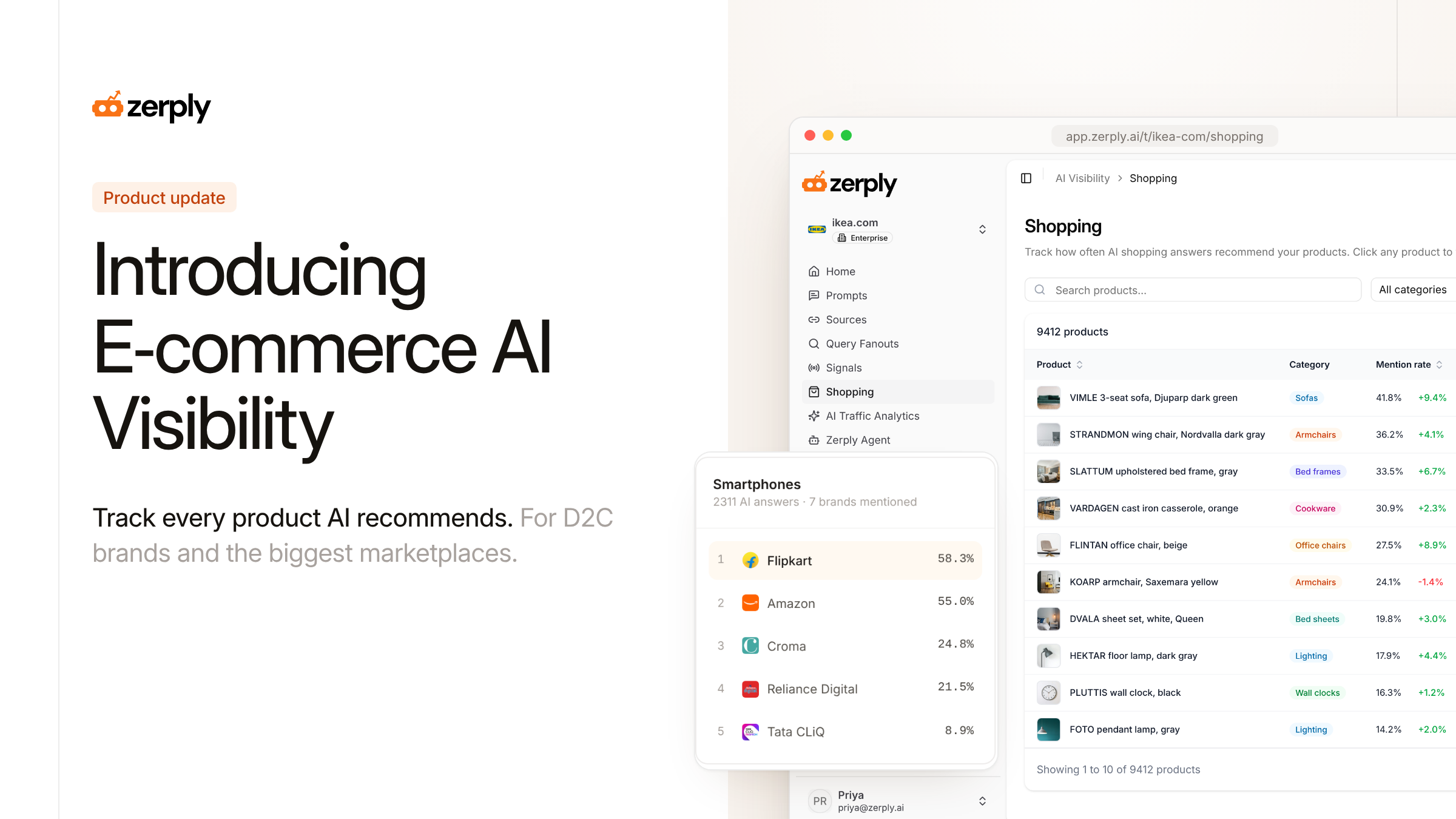
Introducing E-commerce AI Visibility

Shoppers ask AI assistants what to buy. Zerply now tracks which of your products ChatGPT, Gemini, Perplexity and Google AI Mode recommend to them.
The problem
Ask ChatGPT for the best running shoes under ₹5,000 and the answer often comes with product cards. Each card has a price and a link to a store. Google AI Mode and Gemini show products in a similar way, and shoppers click those links.
Brand-level tracking gives a store one number for the whole catalog. A store with 9,000 products needs that number for each product and for each category. It also needs to see the competitor products that AI puts in the same answer.
Marketplaces have one more question. AI often names a product and then links to a store where you can buy it. A marketplace wants to know how often that link goes to its own store.
What's new
E-commerce AI Visibility brings your product catalog into Zerply and tracks it in every daily AI Visibility run. It works for brands that sell their own products and for marketplaces that sell many brands.
Connect the catalog you already have
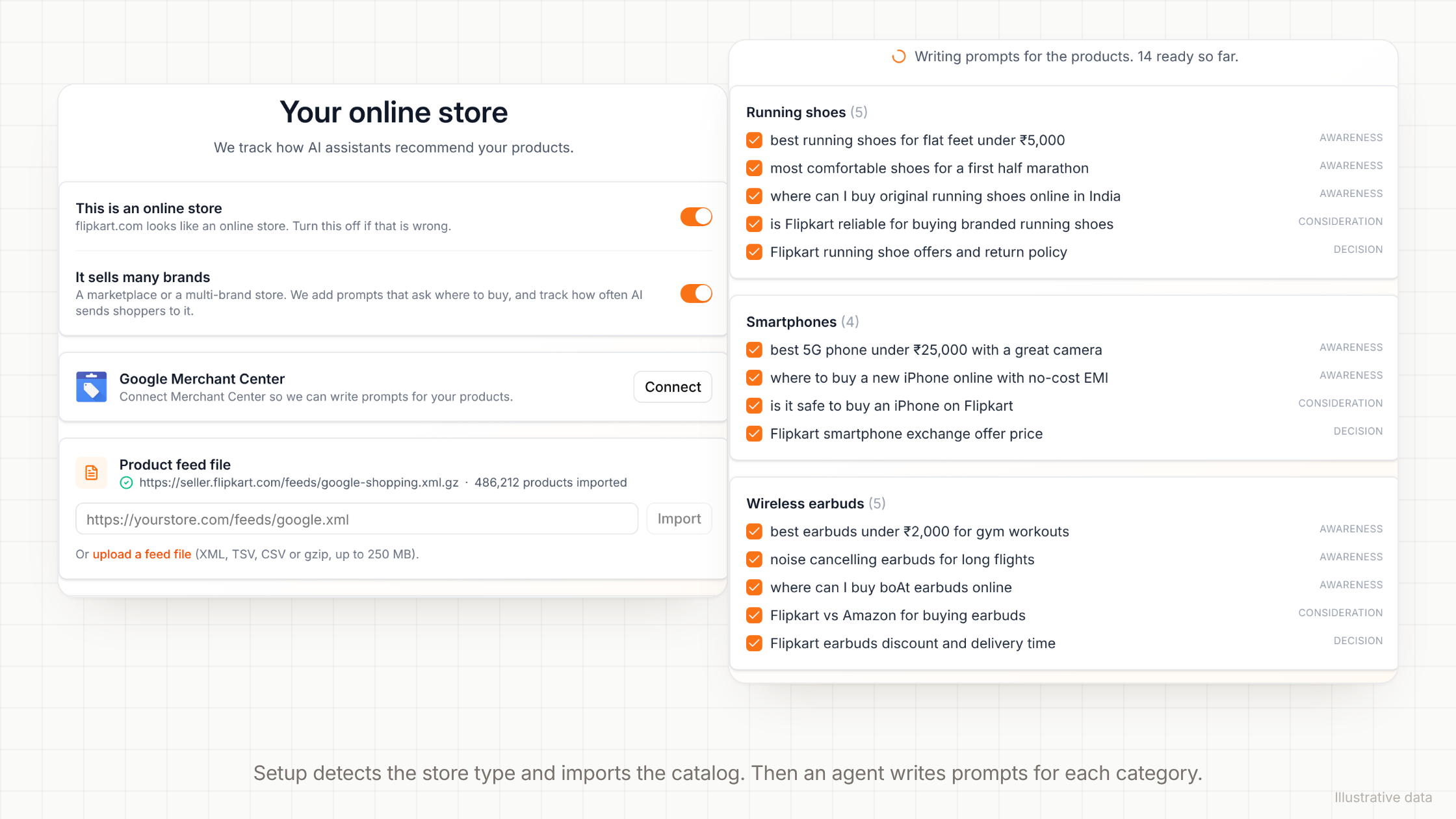
When you add a website, Zerply checks if it is an online store. It also checks if the store sells many brands, like a marketplace. You can change both answers in the store step of setup, or later in Settings → General.
Then connect your catalog from one of these sources:
- Shopify. Enter the store address. Zerply reads the public catalog, so you do not need to log in.
- Google Merchant Center. Connect your Google account and pick the Merchant Center account.
- Product feed. Add the link to the feed you send to Google Shopping, or upload the file. A feed can have up to 500,000 products.
- Website collections. If you cannot share a catalog, Zerply reads the category pages in your sitemap and keeps the ones people search for most.
If you connect nothing, Zerply builds a product list from the products that AI answers already show for your store.
Prompts written for your shoppers
Zerply sorts your products into the categories from your catalog and gets the monthly search volume for each one. An agent then writes the prompts. It picks shopper profiles from your customer documents and brand guidelines, such as "Parent of a toddler" or "First half marathon". It also reads keyword ideas, plus the Google AI Mode queries in your Search Console data.
Each category gets prompts for every funnel stage. Marketplaces also get prompts that ask where to buy a product. Store prompts go straight into tracking. On a standalone plan, up to 200 store prompts sit outside your plan's prompt limit.
Product cards from every major AI engine
Each daily run records the product cards in the answers. Zerply reads them from six AI engines, including ChatGPT and Google AI Mode. Some engines show product cards in fewer answers than others. Zerply matches each card to a product in your catalog.
Store teams get new sections on AI Visibility → Home:
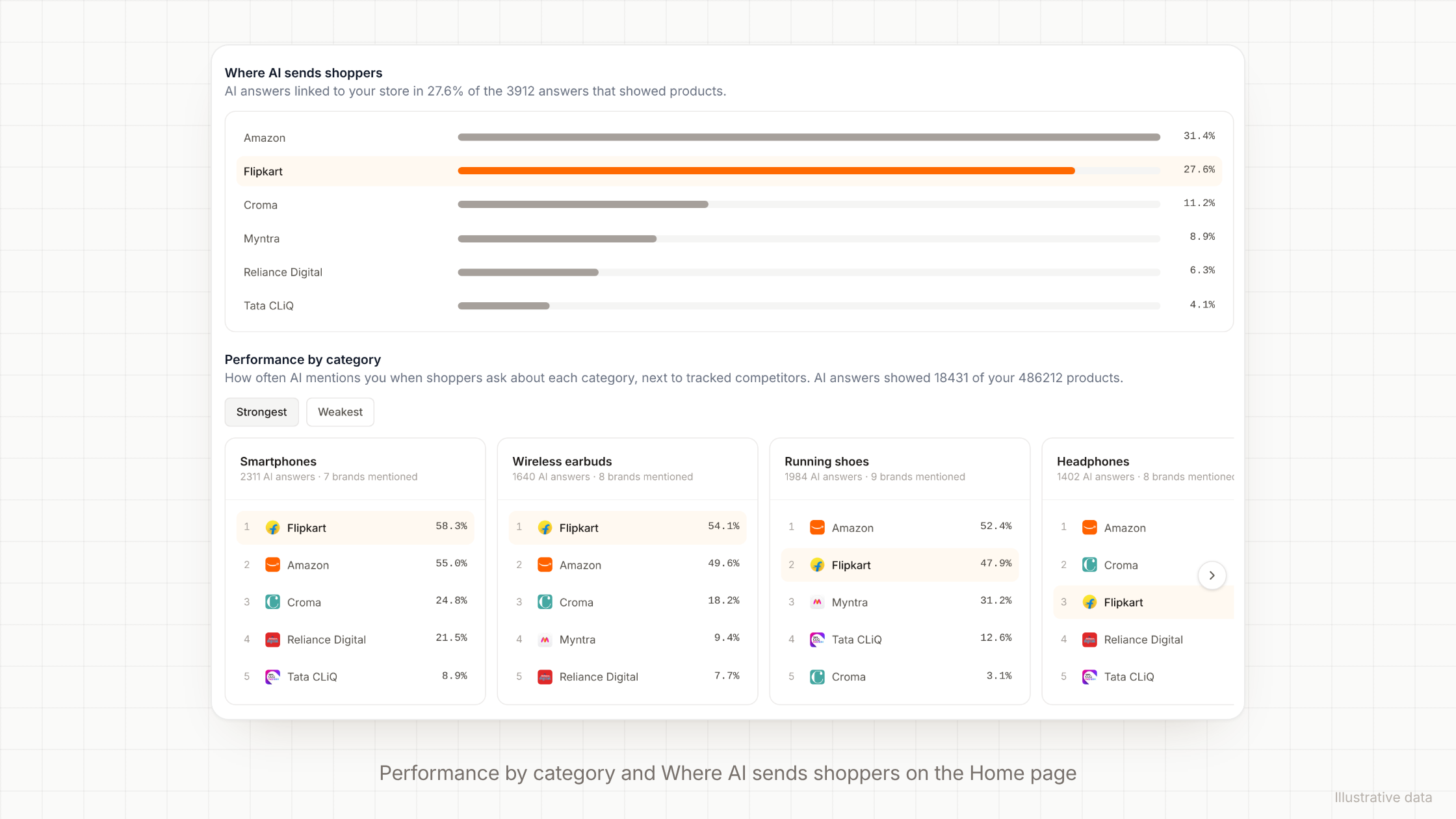
- Performance by category shows a card for each category. Each card ranks the tracked brands by mention rate and shows how your rate changed since the last period.
- Where AI sends shoppers lists the stores that AI answers link to when they show products. A marketplace sees the share of those answers that link to its own store.
- Your products in AI answers lists the products that AI shows most.
- Products in AI responses is a feed of the products in recent answers, marked as yours or a competitor's.
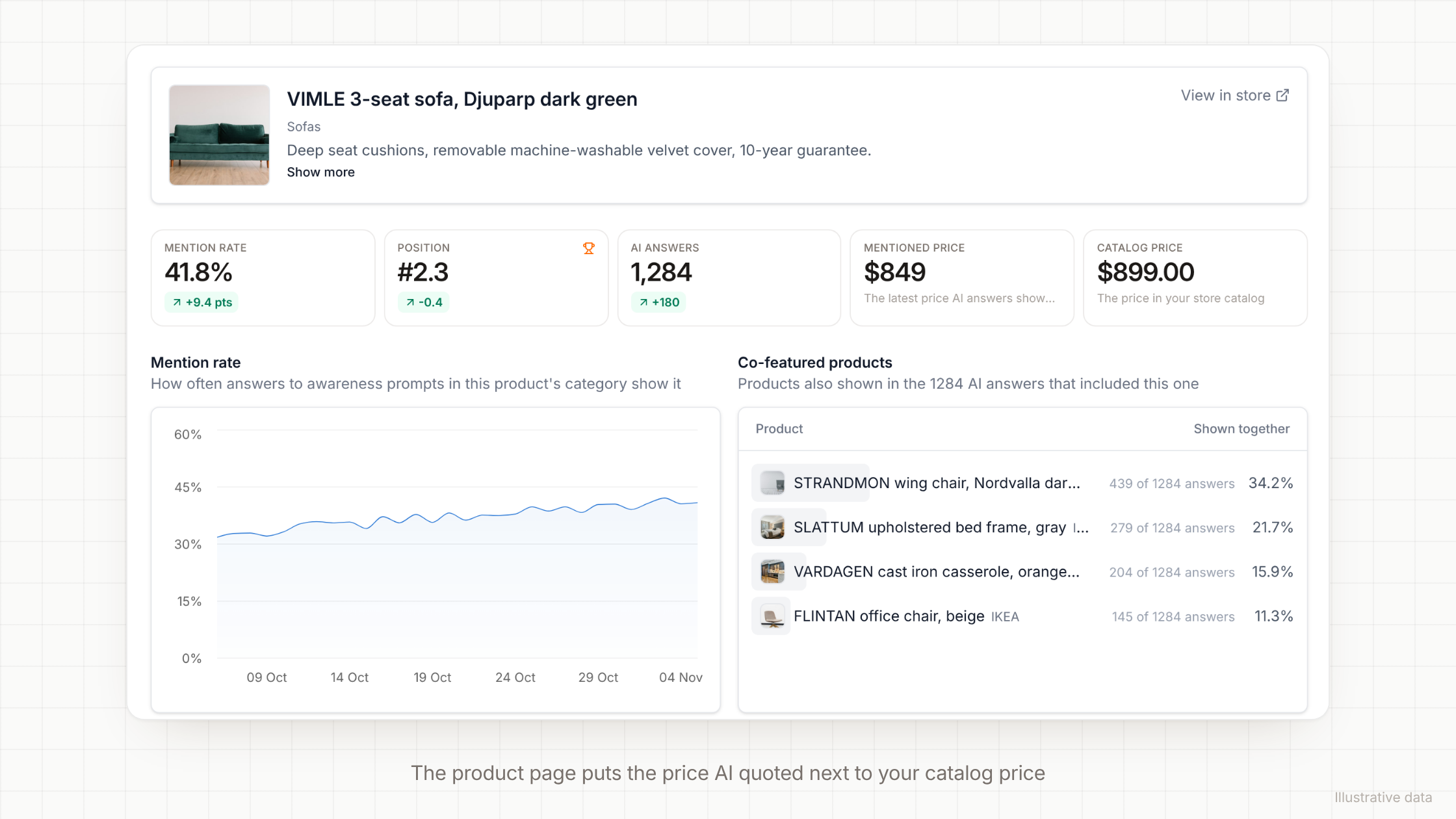
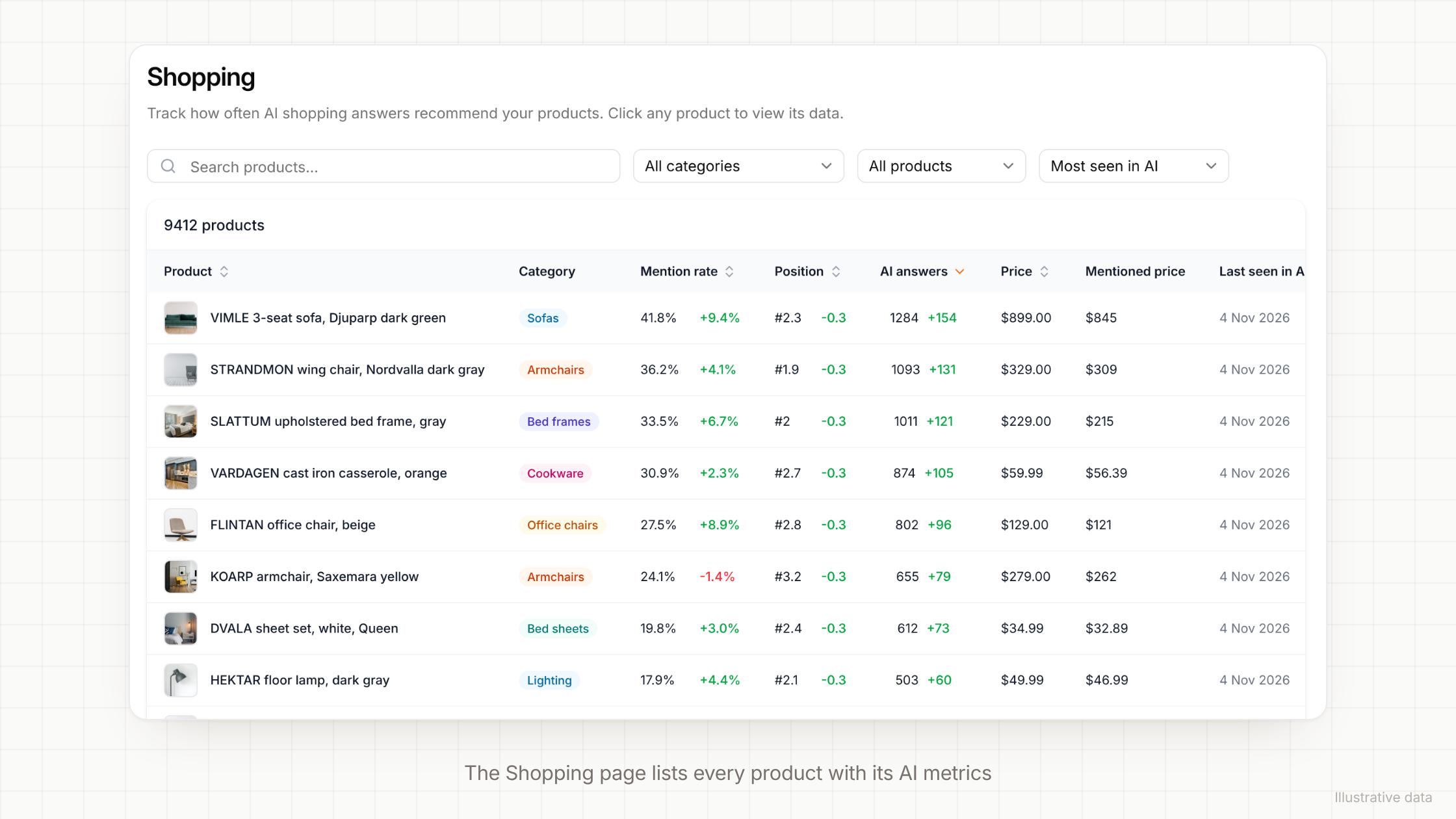
The new Shopping page lists your whole catalog. Each row has the mention rate, position, AI answers, catalog price and the price that AI quoted. Open a product to see its mention rate over time. The product page also lists the products that AI showed with it, the competitor products, the prompts and answers that showed it, and the web searches AI ran before it answered.
What you can do now
- Find the products AI never shows. Filter the Shopping page to "Not seen in AI" and sort by price. Start with the expensive products that get no mentions.
- Work on your weakest categories. Sort Performance by category by Weakest. Each card names the tracked brands that AI recommends ahead of you.
- Check the price AI quotes. When the mentioned price and the catalog price differ, open the answers and check the pages that AI cites. An old product page or a reseller listing is a common cause.
- See who you lose to. Competitor products lists the products that AI showed in the same answers as yours. Fan-out queries show the web searches that led there.
- Grow your share as a marketplace. Where AI sends shoppers shows how often shopping answers link to your store, next to each rival store.
- Get store findings in Signals. Signals adds category and product gaps to its plan. It also checks prices, discounts, returns and shipping in the answers to buying prompts.
- Ask in chat. Zerply chat can answer questions about your products and categories. If Claude or Cursor is connected to Zerply through MCP, you can ask there too.
- Set it up for clients. Agencies get the same store step for each client and for each pitch.
Try it now
E-commerce AI Visibility is live for every team with AI Visibility tracking. Start your trial and add your store. Setup detects the store and asks for your catalog.
If you already use Zerply, turn on E-commerce in Settings → General. Connect your catalog in Settings → Integrations, then open Shopping in the sidebar. You can also read our docs on E-commerce AI Visibility.
Written by
Founder, Zerply.ai & Wittypen
Preetesh Jain is the Founder of Zerply.ai and Wittypen. He specializes in SEO, Answer Engine Optimization (AEO), AI search visibility, content marketing, and product development. Through his work building AI-powered marketing platforms, he helps businesses improve their organic presence across Google, ChatGPT, Perplexity, Claude, and other emerging discovery channels. He regularly writes about AI search, organic growth, content strategy, and the future of digital marketing.
RELATED READS
GSC and GA4 Editorial Calendar: How to Turn Search Data Into a Content Plan
 Anshul MotwaniOct 30, 2026
AI Content Refresh Workflow: How to Update Old Posts for Search and AI Citations
Anshul MotwaniOct 30, 2026
Agentic SEO Workflow: How to Run AI Agents for SEO Without Losing Control
Anshul MotwaniOct 30, 2026