
How AI Platforms Are Reading Your Site
Your brand’s AI visibility is not just about what you say in your prompts. It is also about whether AI platforms are actually reading your website in the first place. Before an AI model can recommend your brand, cite your content, or mention you in a response, its crawler needs to have visited your site and found something worth referencing.
Most brands have no idea this is happening. They know about Google’s crawlers because SEO tools have tracked those for years. But the new wave of AI crawlers from OpenAI, Anthropic, Meta, Perplexity, ByteDance, Amazon, and others operate completely separately and most analytics tools do not show them at all.
Zerply surfaces this data directly inside AI Visibility so you can see the full picture in one place.
How to open your crawler data
Section titled “How to open your crawler data”Open AI Visibility from the sidebar and click AI Traffic. You will see your crawler data for the selected date range at the top right of the screen. Adjust the date range to look at a longer or shorter window depending on what you want to understand.
What the Daily Crawler Activity chart tells you
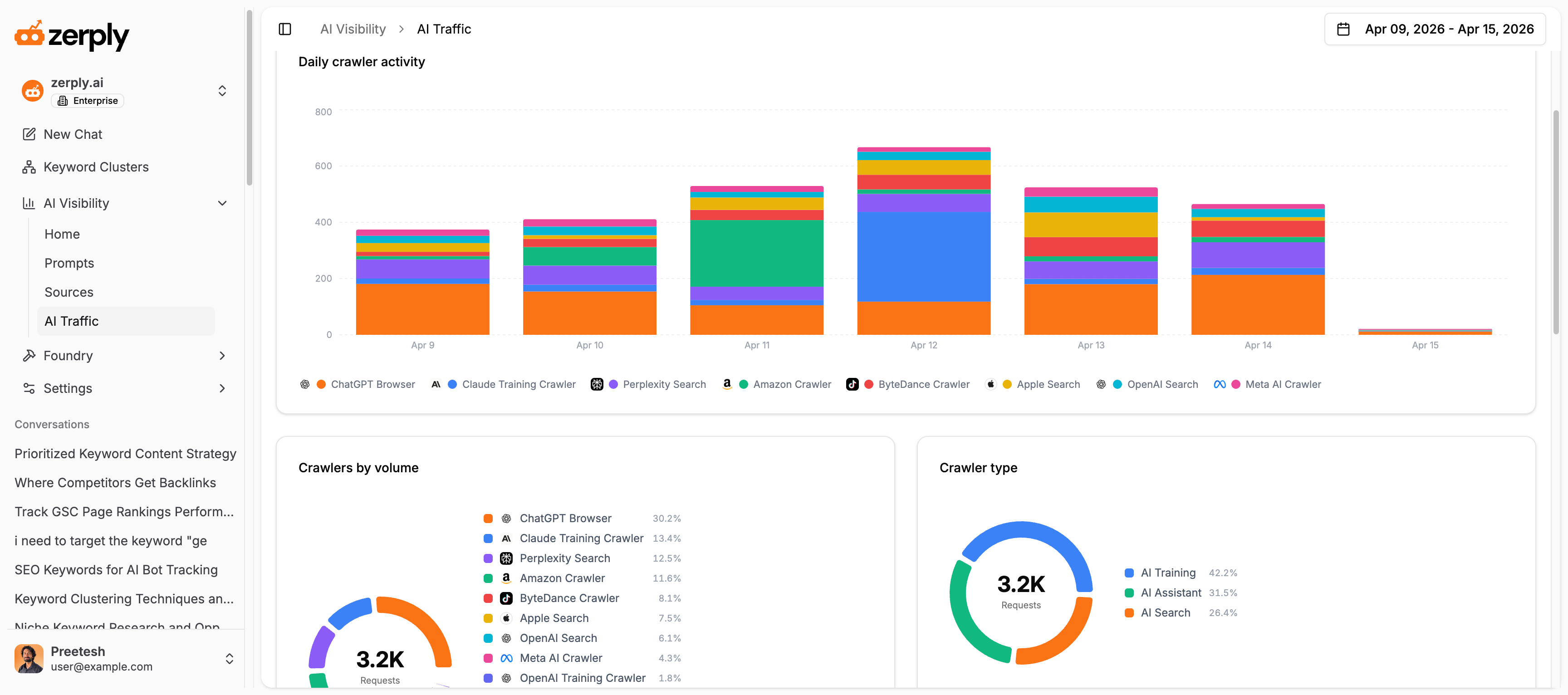
Section titled “What the Daily Crawler Activity chart tells you”The first thing you see is a stacked bar chart showing daily crawler activity across your site. Each bar represents one day and each color within the bar represents a different bot. Hovering over any bar shows you the exact request count per bot for that day.
This chart answers a question most brands have never been able to answer before: on any given day, which AI platforms were actively reading my website?
Look for patterns here. A consistent presence from certain bots day after day is a healthy sign. A sudden drop in activity from a bot that was previously visiting regularly can signal that something on your site changed, like a robots.txt update, a page being removed, or a technical issue that is blocking access.
Filtering by bot, category, and operator
Section titled “Filtering by bot, category, and operator”Above the chart you will find three filters: All Bots, All Categories, and All Operators.
The All Bots filter lets you isolate a single crawler. Zerply tracks over fifteen individual bots including ChatGPT Browser, Meta AI Crawler, Perplexity Search, ByteDance Crawler, OpenAI Training Crawler, Claude Training Crawler, Amazon Crawler, OpenAI Search, Apple Search, Perplexity Browser, Claude Browser, Google AI Crawler, DuckDuckGo AI Assistant, Common Crawl, Claude Search, and Google Vertex AI. Selecting one bot filters every chart and table on the page to show only that bot’s activity.
The All Categories filter groups bots by what they do. AI Training crawlers are building or updating AI model training datasets. AI Assistant crawlers are gathering information to answer real-time user questions. AI Search crawlers are powering search results inside AI platforms. Understanding which category is most active on your site tells you something meaningful about how AI platforms are currently using your content.
The All Operators filter groups bots by the company behind them. OpenAI, Anthropic, Meta, Google, Perplexity, ByteDance, Amazon, Apple, and others each operate their own crawlers. Filtering by operator tells you which companies are paying the most attention to your site right now.
Understanding Crawlers by Volume and Crawler Type
Section titled “Understanding Crawlers by Volume and Crawler Type”Scroll down and you will see two donut charts sitting side by side.
Crawlers by Volume shows the percentage breakdown of total requests across all active bots for the selected period. This tells you at a glance which bots are most interested in your site. If ChatGPT Browser accounts for nearly 40 percent of your total AI crawler requests, that is a strong signal that OpenAI’s systems are actively reading your content. If a major crawler like Claude Training Crawler or Meta AI Crawler shows a very low percentage, it may mean your content is not yet on their radar.
Crawler Type breaks your total requests into three categories: AI Training, AI Assistant, and AI Search. This is one of the most telling views in the entire platform. A site with a high proportion of AI Training traffic is being read by models that are learning from your content. A high proportion of AI Assistant traffic means real-time AI tools are actively consulting your site when answering user questions right now.
What comes next
Section titled “What comes next”Knowing which bots are visiting your site is the first half of the picture. The second half is understanding which specific pages they are reading, how often, and what that tells you about what AI platforms consider worth referencing on your site.