
AI Visibility Tracking
Your onboarding is done and your prompts are already running. The moment you completed setup, Zerply started tracking those prompts across your selected AI platforms and your first visibility data for today is already being collected. This section explains what that data means and how to read it.
The problem this solves
Section titled “The problem this solves”Most brands have a Google Analytics dashboard, a Search Console account, and maybe a rank tracker. None of those tools tell you what happens when someone asks ChatGPT to recommend a tool in your category. You have no visibility into whether your brand gets named, what context it gets named in, and whether a competitor is consistently outranking you in those conversations.
AI Visibility Tracking fills that gap. It runs your tracked prompts across the AI platforms you selected during onboarding, records every response, and turns that raw data into four metrics that actually tell you where you stand.
The four things Zerply measures
Section titled “The four things Zerply measures”Mention Rate tells you how often your brand appears in AI responses to your tracked prompts. If Zerply ran your prompt 100 times across all selected platforms and your brand was mentioned in 34 of those responses, your Mention Rate is 34 percent. This is your baseline visibility number.
Share of Voice tells you how dominant your brand is compared to the competitors you added during onboarding. It is not enough to know you are being mentioned. What matters is whether you are being mentioned more or less than the alternatives your customers are also considering. Share of Voice answers that question directly.
Sentiment tells you how AI models describe your brand when they do mention you. Zerply categorizes every mention into one of five labels: Recommended, Praised, Neutral, Criticized, or Warned. A high Mention Rate with mostly Neutral or Criticized sentiment is a problem worth knowing about before your customers find it themselves.
Citation Rate tells you how often AI models are actively linking back to your content as a source when they answer questions. Citations are a strong signal that AI platforms consider your content trustworthy and authoritative.
How to read your dashboard
Section titled “How to read your dashboard”Open AI Visibility from the sidebar. The Home screen is your main overview. Here is what each part shows you.
The filter bar at the top controls everything on the page. You can filter by date range, by specific AI platform, by brand, and by prompt tags. Every chart and table on the page responds to these filters together, so when you change the date range, everything updates at once.

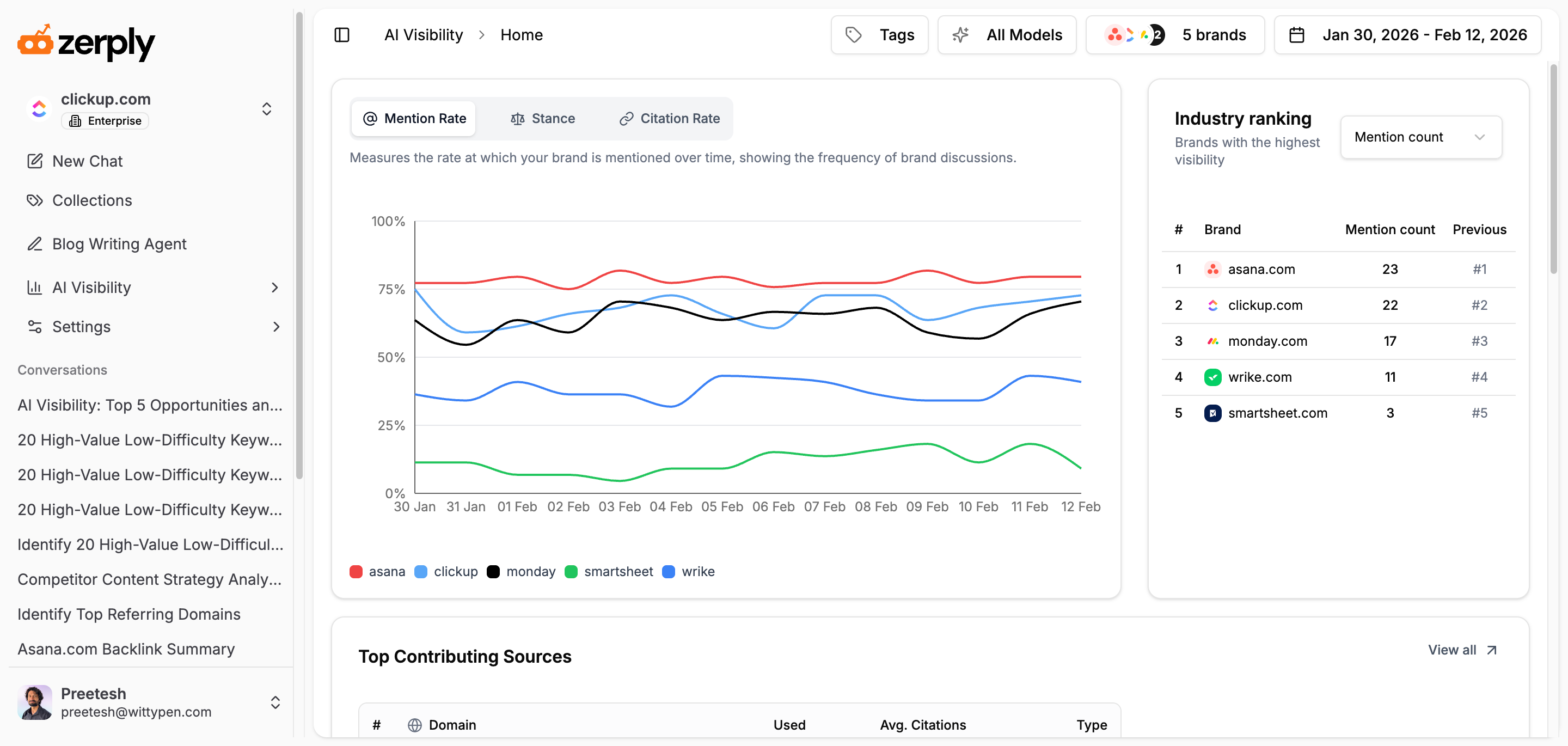
The main chart in the center shows your Mention Rate, Sentiment breakdown, Citation Rate, and AI Traffic over the selected period. You can switch between these using the tabs above the chart. The Mention Rate and Citation Rate tabs show trend lines over time. The Sentiment tab shows a breakdown of how your mentions are being categorized. Use this to spot if something shifted, for example if your Sentiment suddenly drops in a specific week, that is worth investigating.
The Share of Voice panel sits alongside the main chart and shows your average Share of Voice compared to competitors over the same period. You can also switch this to Context Role, which breaks down whether your brand is appearing as the main subject of an AI response, as a supporting reference, or only in a disclaimer context.
The Industry Ranking card on the right ranks all the brands you are tracking by Mention count, Share of Voice, Mention Rate, or Citation Rate. You can switch between these metrics using the dropdown. This gives you a quick competitive snapshot without needing to dig into individual charts.
The Prompt Responses list at the bottom shows you the actual AI responses that Zerply recorded for each of your tracked prompts. Click any row to open the full response and read exactly what the AI said, which model said it, and whether your brand was mentioned.
What to look for first
Section titled “What to look for first”When you open AI Visibility for the first time, resist the urge to look at every number at once. Start with two things.
First, check your Mention Rate. If it is low, that tells you your brand is not appearing in the AI conversations that matter to your category. That is not a bad thing to discover early. It tells you exactly what to work on.
Second, check the Industry Ranking. See where you sit relative to your competitors. If a competitor has a significantly higher Share of Voice, open your Prompt Responses and look at what those responses actually say. You will often find that the competitor is being cited from specific sources, which brings you to the next important area inside AI Visibility.
Sources: what is actually driving AI responses
Section titled “Sources: what is actually driving AI responses”Open AI Visibility and click Sources in the sidebar. This view shows you the domains and specific URLs that AI models are citing when they answer your tracked prompts.
This is one of the most actionable parts of the entire platform. AI models do not generate brand recommendations from nothing. They pull from the content they have indexed. If a competitor is consistently outranking you, it is almost always because their brand appears more frequently and more positively in the sources AI models trust, like review sites, industry publications, Reddit threads, and comparison pages.
The Sources view tells you exactly which of those sources are influencing responses in your category right now. That information tells you where to focus your content and PR efforts to shift what AI says about you over time.
Choosing your tracked platforms wisely
Section titled “Choosing your tracked platforms wisely”During onboarding you selected which AI platforms to track. Depending on your plan, you can track any four from the available list which includes ChatGPT, Google AI Overviews, Google AI Mode, Gemini, Perplexity, Microsoft Copilot, and Grok. Enterprise plans can track additional platforms.
Choose platforms based on where your audience actually is. If your customers are primarily researchers and professionals, Perplexity is a high priority. If they are everyday consumers, ChatGPT and Google AI Mode are likely more relevant. You can adjust your tracked platforms from Settings as your needs change.
What comes next
Section titled “What comes next”The data you see in AI Visibility is only as good as the prompts driving it. Before diving deeper into your charts and competitor comparisons, it is worth making sure your prompts are set up to capture the conversations that actually matter to your business.