
Setting Up Your Prompts
Everything you see inside AI Visibility, your Mention Rate, Share of Voice, Sentiment, and Citation Rate, comes from the prompts you track. If your prompts are not reflecting the real questions your customers ask AI platforms, the data you get back will not reflect your real visibility either. Getting this right is the most important setup decision you make in Zerply.
What a prompt actually is
Section titled “What a prompt actually is”A prompt is a plain language question that Zerply submits to your selected AI platforms every day, exactly the way a real user would type it. Zerply then records what each platform says back, checks whether your brand appears in the response, and scores that response for mentions, sentiment, citations, and Share of Voice.
Think about the questions your potential customers are typing into ChatGPT or Perplexity right now. They are not searching with keywords the way they would on Google. They are asking full questions like “what is the best tool for tracking my brand on AI platforms” or “how do I know if ChatGPT is recommending my product.” Those are the kinds of prompts that will give you meaningful data.
What makes a good prompt
Section titled “What makes a good prompt”A good prompt sounds like something a real person would genuinely ask an AI assistant. Here are the principles to follow.
Write conversationally, not like a search query. Prompts like “AI brand tracking software” will not give you useful results because nobody asks AI platforms in keywords. Write full questions instead: “What tools can I use to track how my brand appears on ChatGPT and Perplexity?”
Make it category-level, not brand-specific. Asking “Is Zerply a good platform?” will almost always return a mention of your brand because it is in the question. That does not tell you anything useful. The more valuable question is “What are the best platforms for AI visibility tracking?” because that is a real buying decision question and your appearance in that answer reflects your actual organic visibility.
Cover different stages of your buyer’s journey. Someone early in their research asks different questions than someone ready to buy. A prompt like “what is AI visibility tracking and why does it matter” captures awareness-stage conversations. A prompt like “which AI visibility tracking tool is best for marketing agencies” captures decision-stage conversations. Both matter and both give you different insight.
Keep prompts specific enough to be meaningful. A prompt that is too broad, like “what are good marketing tools,” will return responses that span dozens of categories and your brand will rarely appear. Narrow it to your actual space.
How to manage your prompts in Zerply
Section titled “How to manage your prompts in Zerply”Open AI Visibility and select Prompts from the sidebar. This page shows every prompt your team is currently tracking along with its performance data for the selected date range and model filter.
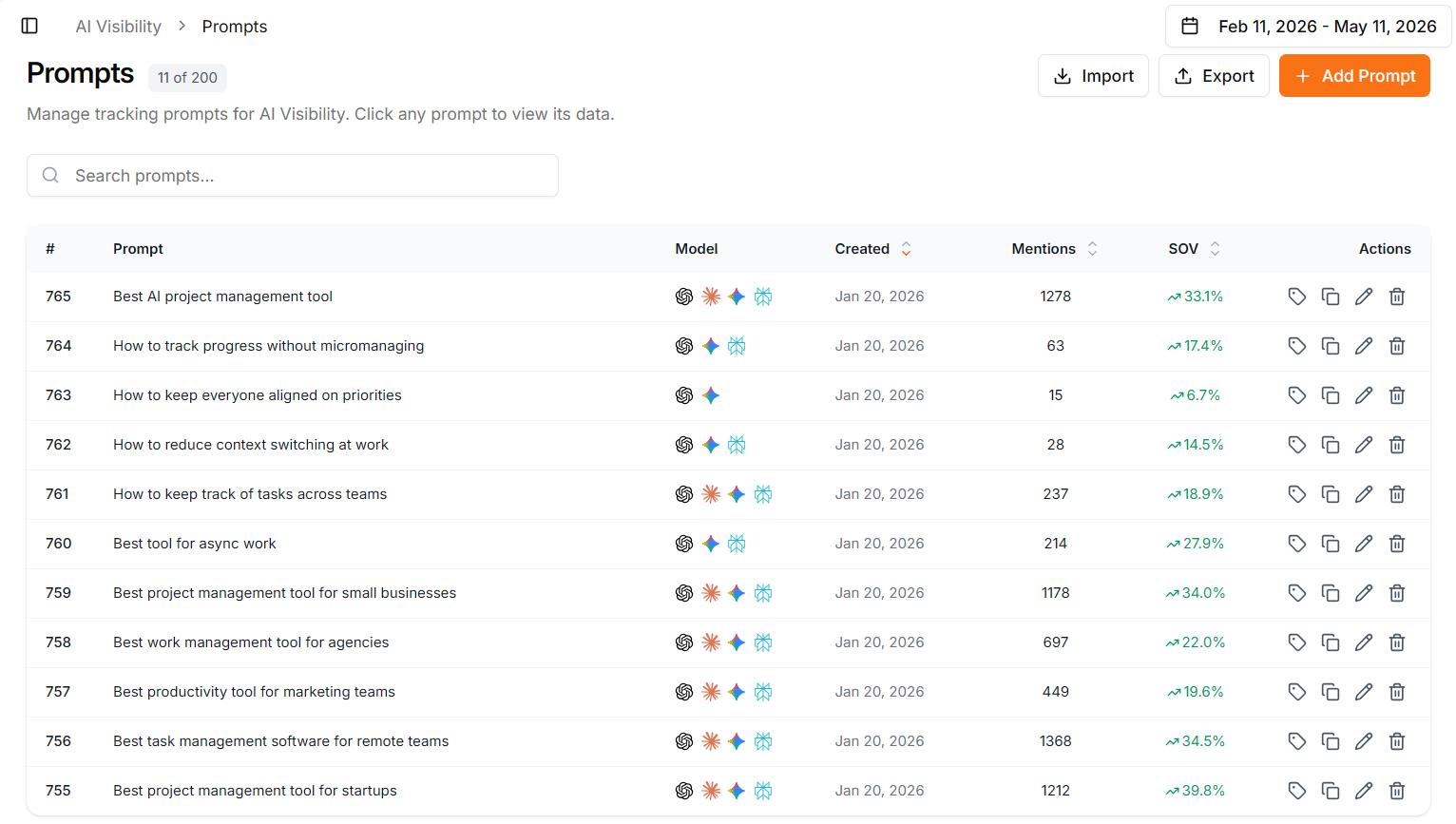
Adding a prompt. Click Add Prompt, type your question in the dialog, and click Create Prompt. The prompt becomes active immediately and Zerply begins tracking it from that day forward.
Importing prompts in bulk. If you have a list of prompts ready, use the Import button to upload a CSV or Excel file. Your file needs a Prompts column containing the question text. You can also include an optional Tags column with comma-separated tag names to organize your prompts from the start.
Tagging your prompts. Tags let you group prompts by theme, campaign, product line, or any other category that makes sense for your business. You can then filter your entire AI Visibility dashboard by tag, which means you can isolate visibility data for a specific topic or use case without mixing it with everything else. Manage your tag names and colors under Settings and then Prompt Tags.
Editing and deleting prompts. Click the edit icon on any prompt row to update its text. Click delete to remove it. Deleting a prompt removes it from future tracking but your historical data for that prompt is retained.
Sorting and searching. You can sort your prompt list by when it was created, by total mentions, or by Share of Voice. Use the search field to filter by prompt text when your list grows large.
How many prompts should you track
Section titled “How many prompts should you track”Start focused rather than broad. A set of ten to fifteen well-chosen prompts will give you clearer and more actionable data than fifty vague ones. Your plan determines how many prompts you can track each month, so use that allocation deliberately.
As you start reading your results, you will naturally find gaps. Certain questions you assumed your brand would appear in will show low or zero mentions. Those gaps are signals. Add prompts that target those gaps specifically, and over time your tracking will become a precise map of where your brand stands and where it does not.
Reading prompt-level data
Section titled “Reading prompt-level data”Click any row in your prompt list to open the analytics view for that specific prompt. You will see how that single question has performed across your selected AI platforms, which models returned mentions, how your Mention Rate and Share of Voice look for just that prompt, and the actual recorded responses at the bottom.
This prompt-level view is particularly useful when you want to understand why a specific topic is or is not performing. You can read the exact AI responses and see firsthand what the platform said, who it recommended, and where your brand landed in that conversation.
What comes next
Section titled “What comes next”With your prompts set up correctly, Zerply begins building a clear picture of where your brand appears and where it does not. The next step is learning how to read those mentions in detail so you can understand not just whether you are appearing, but how you are being described and what is driving those responses.