
Tracking Share of Voice
Knowing that your brand is being mentioned is one thing. Knowing whether you are being mentioned more or less than the competitors your customers are also considering is what actually tells you where you stand.
That is what Share of Voice measures. It is your brand’s share of total mentions compared to every other brand appearing in the same AI responses. Share of Voice is always relative. It reflects your market presence in AI conversations compared to others in your category, not an absolute score.
Where to find your Share of Voice
Section titled “Where to find your Share of Voice”Open AI Visibility and go to Home. Below the main chart tabs you will see a toggle between Share of Voice and Context Role. Select Share of Voice.
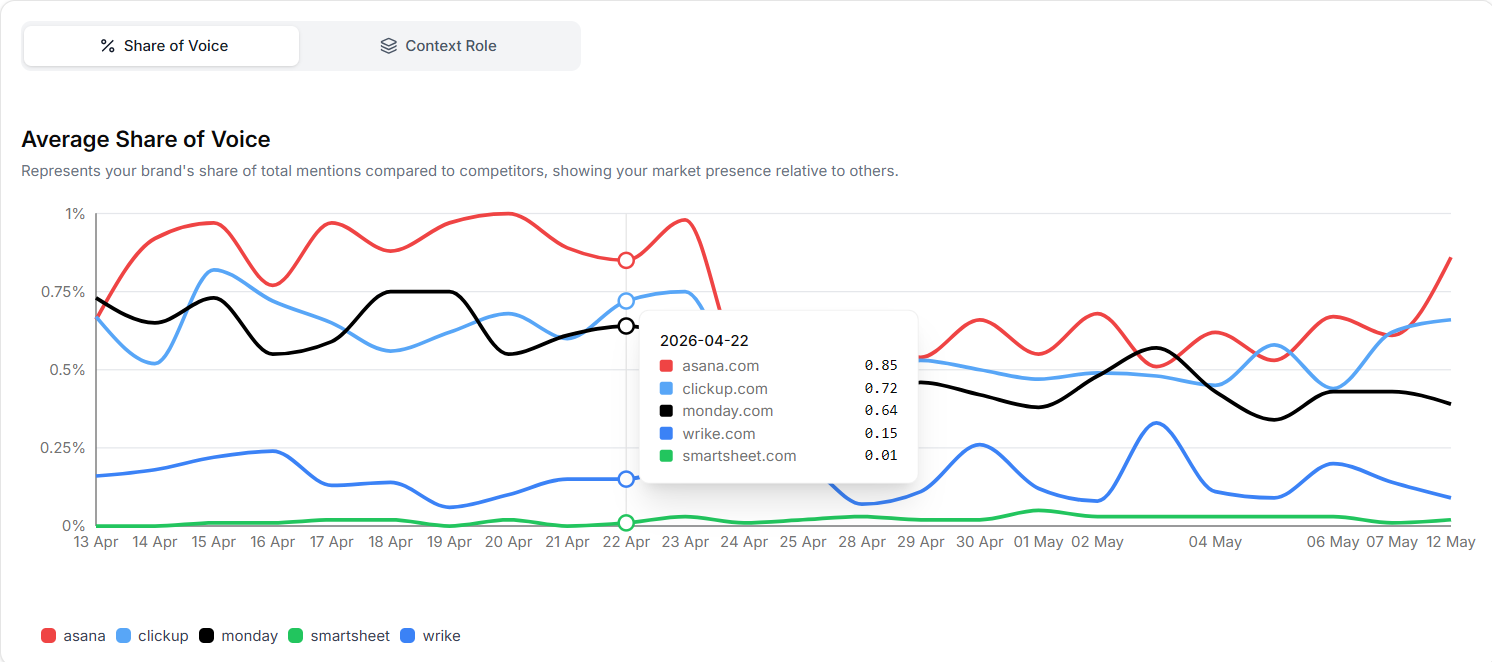
The chart here shows your Average Share of Voice as a trend line over time. Each brand you are tracking appears as a separate line so you can see how your Share of Voice moves relative to competitors day by day across the selected date range. Hovering over any point on the chart shows you the exact Share of Voice value for each brand on that date.
The Industry Ranking card
Section titled “The Industry Ranking card”On the right side of the Home screen you will see the Industry Ranking card labeled “Brands with the highest visibility.” This ranks every brand you are tracking by the metric you select in the dropdown.
The dropdown includes Mention count, Share of Voice, Mention Rate, and Citation Rate. Each view gives you a different lens on the same competitive landscape. The table shows the current rank, the brand, the metric value, and the previous rank so you can see at a glance whether positions are shifting.
This card gives you the fastest competitive snapshot in the platform. If you drop a position between one period and the next, that is a signal worth investigating by looking at which prompts drove the change.
Share of Voice in your Prompts list
Section titled “Share of Voice in your Prompts list”Open AI Visibility and click Prompts. The prompts table includes a SOV column showing your average Share of Voice for each individual prompt during the selected period.
This view is particularly useful because it shows you which specific questions your brand is winning and which ones you are losing. A prompt about a topic you consider a core strength showing a low Share of Voice is a direct signal that your content around that topic is not reaching the sources AI platforms are consulting.
Context Role: how you appear, not just how often
Section titled “Context Role: how you appear, not just how often”Toggle from Share of Voice to Context Role on the same chart area. This switches to a pie chart showing the breakdown of how your brand appears in AI responses across three categories.
Main Narrative means your brand is the central subject of the AI response. The response is primarily about you or your category with your brand as the focus.
Sources/References means your brand is cited as supporting evidence or a reference point within a broader response about something else.
Disclaimer means your brand appears in a cautionary or qualifying context, often in responses where the AI is hedging its recommendation.
Context not found means Zerply could not determine the context role from that particular response.
A brand with a strong Share of Voice but mostly Sources/References context is being cited frequently but rarely as the primary answer. That tells you something specific about how AI platforms currently perceive your authority in the category and points to the type of content you need to create to shift that perception.
What a healthy Share of Voice trend looks like
Section titled “What a healthy Share of Voice trend looks like”You are looking for two things over time. First, is your Share of Voice stable or growing across the trend line? A declining trend even with a stable Mention Rate means competitors are gaining ground faster than you are.
Second, check the Industry Ranking regularly. Watching your position move up or down over successive periods is one of the clearest indicators of whether your content and visibility efforts are working.
What comes next
Section titled “What comes next”You now understand where your brand stands in AI conversations and how you compare to competitors. The next step is understanding what AI platforms are actually doing when they visit your website and which pages they are paying the most attention to.