AI Sitemap Strategy for Search and Answer Engines

Direct answer: An AI sitemap strategy means listing only canonical, indexable pages in your XML sitemap, keeping every
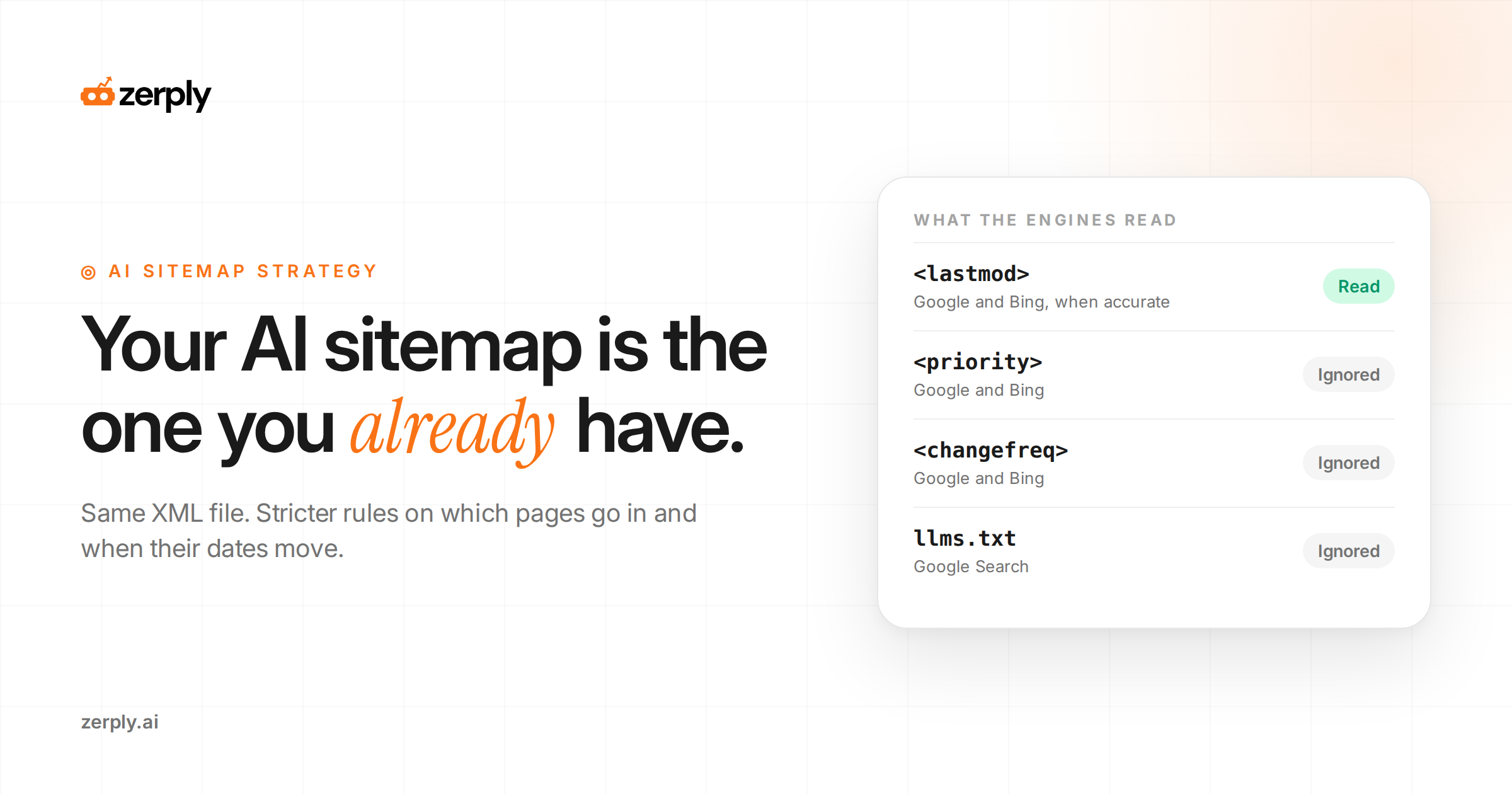
<lastmod>date accurate, and making the file easy to find through robots.txt, Google Search Console, and Bing Webmaster Tools. Google and Bing both ignore<priority>and<changefreq>. Google Search also ignores llms.txt, so treat that file as optional guidance for AI agents.
AI search does not need a new kind of sitemap. It needs a sitemap you can trust. When a pricing page changes, a guide is refreshed, or new documentation goes live, crawlers need a clean signal that the canonical URL exists and that its content is current.
Get that signal wrong; by listing duplicates, changing every date on every deploy, or hiding important URLs behind poor site architecture, and your best pages can be slower to discover and revisit.
The phrase "AI sitemap" suggests a special file built for AI systems. Google's own guidance points to the other way. Its generative AI features, including AI Overviews and AI Mode, retrieve pages from the same Search index as regular results, and Google's guide to optimizing for generative AI states that Search does not use llms.txt or other AI text files.
Bing likewise treats <lastmod> as a useful signal for deciding which URLs to recrawl, so accurate freshness data supports more efficient discovery of changed pages.
This guide gives you a defensible operating model rather than another speculative AI-search tactic.
What you'll learn
- How to decide which canonical URLs belong in your sitemap, and which ones create crawl noise.
- How to maintain honest
<lastmod>values that give Google and Bing a useful freshness signal. - Where an llms.txt file fits, where it does not, and when a managed llms.txt generator is worth using.
- How to submit, monitor, and validate your sitemap so your priority content stays discoverable to search and answer engines.
What is an AI sitemap strategy?
An AI sitemap strategy is a plan for which URLs your XML sitemap lists, how their dates are maintained, and how you verify that search and answer engines are fetching them. It uses the same sitemap protocol Google and Bing already support, with stricter rules about what goes in.
The underlying file, an XML sitemap, lists the URLs you want search engines to discover, with optional metadata such as the date each page last changed. Google describes submitting one as a hint. It does not guarantee a crawl or a place in the index.
How do search and answer engines use your sitemap?
Search and answer engines use a sitemap to discover URLs and decide which ones to recrawl, and each one documents different rules.
| Engine | <priority> and <changefreq> |
<lastmod> |
How to submit | What the docs say about AI |
|---|---|---|---|---|
| Ignored | Used when consistently and verifiably accurate | Search Console, the Search Console API, or robots.txt | AI Overviews and AI Mode draw on the Search index. llms.txt is ignored. | |
| Bing | Ignored | Useful recrawl signal; a full ISO 8601 timestamp is preferred | Bing Webmaster Tools or robots.txt, plus IndexNow for single URLs | Copilot search relies on Bing’s indexed web content |
| OpenAI (ChatGPT search) | Not documented | Not documented | No sitemap submission documented | Crawler docs cover user agents, IP ranges, and robots.txt controls |
Google reads sitemaps in XML, RSS, Atom, and plain text formats, with a limit of 50,000 URLs or 50MB uncompressed per file. It uses <lastmod> only when the date is consistently and verifiably accurate, for example when it matches the page's real last change, according to Google Search Central's sitemap documentation.
Bing fetches submitted sitemaps and revisits them over time. The Bing team recommends full timestamps in <lastmod> and pairing sitemaps with IndexNow, a protocol that notifies participating search engines when a URL is added, updated, or removed, as its webmaster guidance on sitemaps explains.
OpenAI publishes controls for OAI-SearchBot, the crawler behind ChatGPT search, but its crawler overview does not document how that bot treats sitemaps. For ChatGPT, the documented lever is crawler access in robots.txt. The Sitemap: line makes the file available to crawlers that support and read that directive.
Because both engines that document the <priority> tag ignore it, page priority lives in two other places: whether a URL is in the file at all, and whether its date moves when the page genuinely changes.
Is ChatGPT recommending your competitors instead of you?
See where your brand appears, who is winning visibility, and what you can do about it.
Which pages should belong in your sitemap?
The pages that belong in your sitemap are canonical, indexable URLs you would want quoted in an answer. Google's rule is to list the URLs you want to appear in search results. That means the canonical URL for each piece of content, the single address you prefer when the same content is reachable at several.
Use this page-priority table as a starting filter. It sets inclusion and update rules by page type. It does not set <priority> values, which neither Google nor Bing reads.
| Page type | Include? | Reason | Move <lastmod> when |
|---|---|---|---|
| Product, solution, and pricing pages | Yes | Buyer questions about cost and fit land here | Plan, price, feature, or availability copy changes |
| Comparison and alternatives pages | Yes | They answer evaluation questions in one place | A competitor fact, feature row, or verdict changes |
| Guides, how-to articles, and glossary entries | Yes | They hold the definitions and steps answers are built from | Main content, examples, or outbound links change |
| Docs and help center articles | Yes, in a separate child sitemap | A separate file lets you track its coverage on its own in Search Console | Steps, screenshots, or supported versions change |
| Tag, author, and paginated archive pages | Only with unique content | Bare lists add URLs without adding answers | Unique intro copy is added or revised |
| Parameter, filter, and tracking URLs | No | They duplicate a canonical page | Not applicable |
| Redirects, 404s, noindex, login, and thank-you pages | No | They are not indexable destinations | Not applicable |
A sitemap that lists every URL your CMS can produce spreads crawl attention across pages you would never want cited. Google's generative AI guide flags duplicate content for the same reason: crawlers can waste resources on URLs you do not care about.
How do you create a sitemap.xml file?
You create a sitemap.xml file by letting your CMS generate it, writing it by hand for a small site, or generating it from your site's database for anything larger. Google puts the practical cutoff for manual files at a few dozen URLs.
Whichever route you take, the file has to meet the protocol rules:
- List absolute URLs. Write the full address, such as
https://www.example.com/pricing. Google crawls URLs exactly as listed, so a relative path like/pricingfails. - Encode the file in UTF-8 and entity-escape special characters such as ampersands.
- Stay under the limits. One sitemap holds up to 50,000 URLs or 50MB uncompressed. Past that, split the file and list the parts in a sitemap index, a parent file that points to child sitemaps.
- Place it where its URL scope makes sense. A sitemap in a subfolder normally covers URLs below that path; use the site root for broad coverage, or submit a different location through Search Console when its scope supports your setup.
- Reference it in robots.txt with a line such as
Sitemap: https://www.example.com/sitemap.xml. Google and Bing both read this line. - Submit it in Google Search Console and Bing Webmaster Tools, so you can see fetch dates and processing errors.
What does a working example of sitemap XML look like?
A working sitemap lists canonical, indexable URLs with honest <lastmod> timestamps. It leaves out tags Google and Bing do not use for scheduling, plus URLs that redirect, duplicate another page, or offer little standalone value.
Illustrative example, not a real site's sitemap:
<?xml version="1.0" encoding="UTF-8"?>
<urlset xmlns="http://www.sitemaps.org/schemas/sitemap/0.9">
  <url>
    <loc>https://www.example.com/pricing</loc>
    <lastmod>2026-09-24T09:15:00+00:00</lastmod>
  </url>
  <url>
    <loc>https://www.example.com/features</loc>
    <lastmod>2026-08-11T16:02:00+00:00</lastmod>
  </url>
</urlset>
For a larger site, use a sitemap index that points to child files such as sitemap-pages.xml and sitemap-blog.xml; each child sitemap’s <lastmod> should record when that file changed. Keep URLs clean: use the canonical blog URL, not a utm_ variant; replace redirects with their live destination; and exclude thin archives. There is no need to add <priority> or <changefreq>, because Google and Bing ignore them.
How do you keep lastmod dates accurate?
You keep <lastmod> accurate by tying it to real content changes on the page. Lastmod is the sitemap field that records when a page last changed in a meaningful way.
Google defines a significant update as a change to the main content, the structured data, or the links on a page. A new copyright year in the footer does not count. Bing adds a practical warning: do not set <lastmod> to the time the sitemap was generated unless the page itself changed.
Three habits keep the dates trustworthy:
- Use one source of truth. Pull
<lastmod>from the same field that powers any "updated" date displayed on the page, so the two never disagree. - Ignore template-wide edits. A navigation or footer change touches every page. It should not move every date.
- Push urgent changes separately. For a price change or a corrected fact, submit the URL through IndexNow for Bing and request a recrawl through Search Console for Google. The sitemap catches up on its next fetch.
The payoff is crawl efficiency. Bing says an accurate <lastmod> lets it prioritize changed URLs for recrawling and skip the ones that have not changed since its last visit.
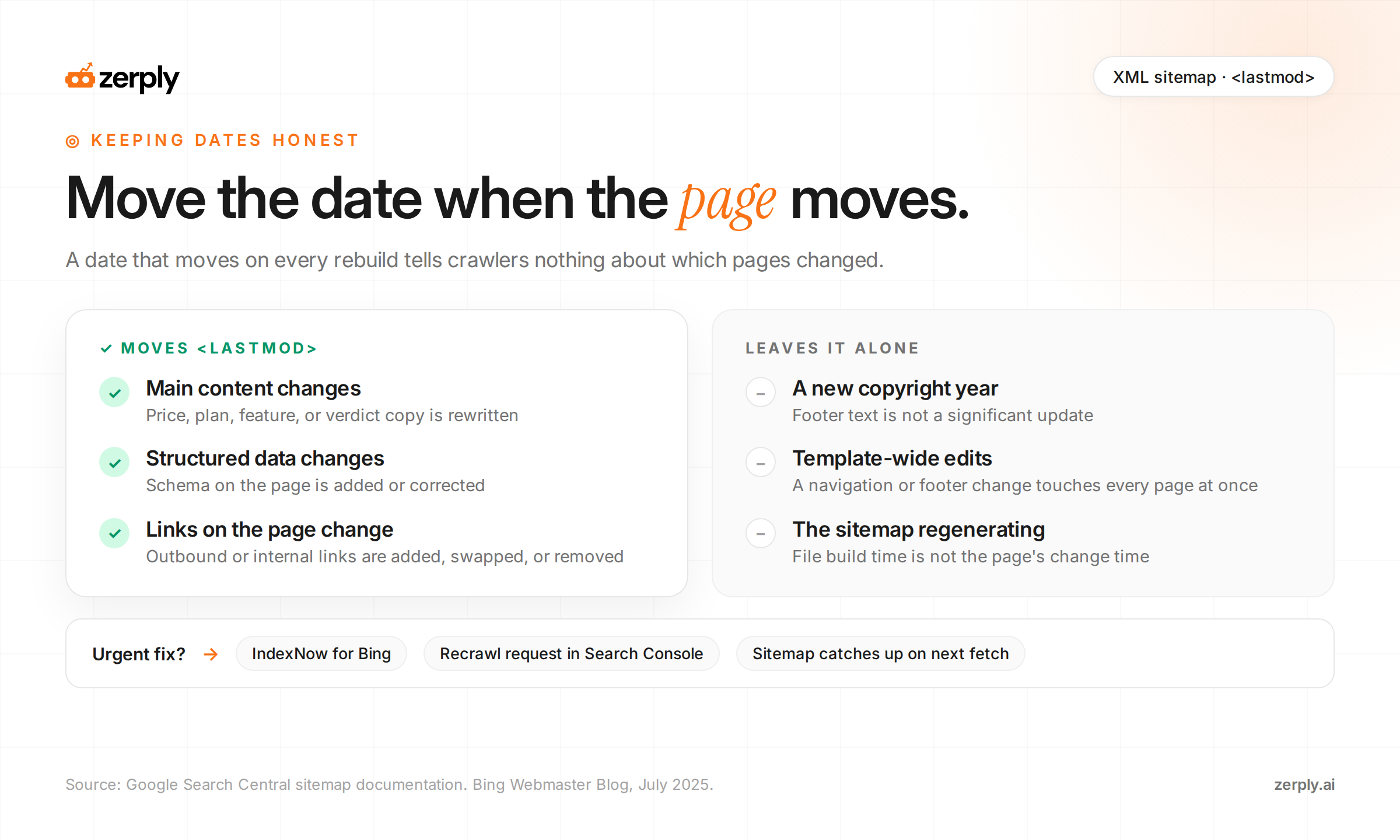
Use this workflow as a governance check: update <lastmod> when page substance changes, not when the sitemap is merely regenerated.
Do you need an llms.txt file, and how do you create one?
You do not need an llms.txt file for Google Search, and it will not change your rankings there, because Google says Search ignores the file. An llms.txt file can still earn its place if AI agents read your documentation or API reference.
An llms.txt file is a Markdown file, usually at /llms.txt, that gives language models a short, curated map of a site with links to clean versions of key pages. It is an emerging proposal rather than a ratified web standard, so support by crawlers and agents is not guaranteed.
The proposal frames llms.txt and sitemaps as different tools. A sitemap lists indexable pages for search engines. An llms.txt file is a small, hand-picked guide intended to fit inside a model's context window when an agent chooses to read it. Treat it as optional documentation, not as proof of crawler access, indexing, or citation eligibility.
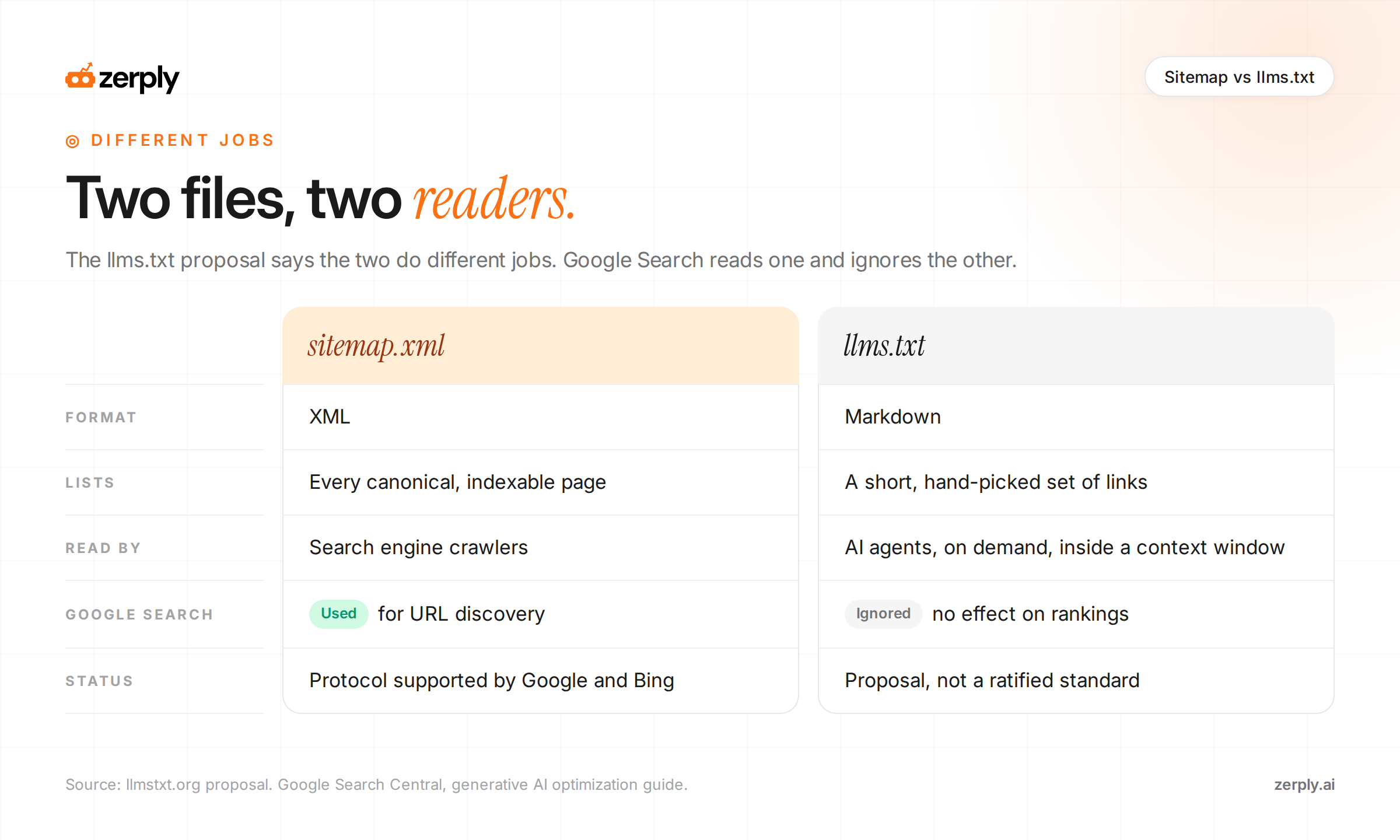
An XML sitemap supports search-engine discovery; an llms.txt file is optional guidance that an agent may or may not read.
To create one, follow the format the llms.txt proposal defines, in this order:
- An H1 with the site or project name. This is the only required section.
- A blockquote with a short summary of the site.
- Optional plain paragraphs with context an agent needs to read the links correctly.
- H2 sections, each holding a Markdown list of links with a short note after each link.
- An optional H2 named "Optional" for secondary links an agent can skip when context is tight.
Illustrative example, not a real company's file:
# Example Co

> Example Co makes scheduling software for field service teams. This file points agents to our product docs, pricing, and API reference.

Prices on the pricing page are monthly, in USD, and exclude tax.

## Docs

- [Getting started](https://www.example.com/docs/getting-started.md): Account setup and first schedule
- [API reference](https://www.example.com/docs/api.md): Endpoints, authentication, and rate limits

## Product

- [Pricing](https://www.example.com/pricing.md): Plans and usage limits

## Optional

- [Changelog](https://www.example.com/changelog.md): Release notes by month
Save it as plain text at /llms.txt, or at a subpath such as /docs/llms.txt to cover only that section. Then test it the way the proposal suggests: give an AI assistant only the file and ask it questions about your product.
The decision rule is short. If developers or agents commonly use your docs, an llms.txt file can be a low-cost experiment, but measure no guaranteed discovery benefit from it. If your goal is visibility in Google AI Overviews or AI Mode, put the effort into your XML sitemap and the pages it lists.
Know where your brand stands in AI
Monitor your visibility across ChatGPT, Google AI Overviews, Gemini, and more.
How do you check that engines are reading the right pages?
You check by comparing three records: what your sitemap lists, what search engines report about the file, and what AI crawlers actually request from your server.
Start with the search engine reports:
- Google Search Console's Sitemaps report records when Googlebot last accessed the file and lists any processing errors.
- Bing Webmaster Tools' Sitemaps section records submission status, the last read date, and errors that could block indexing.
For a wider view of how both consoles now report AI visibility, see what the Google and Bing AI visibility reports actually tell you.
Next, look at the AI crawler side. Server logs record every request, including those from OAI-SearchBot, PerplexityBot, and ClaudeBot. Compare the URLs those bots request against the "Yes" rows in your page-priority table. Three patterns are worth acting on:
- A priority page with no AI crawler requests after an update. Check that it is indexable, linked internally, and open to that bot in robots.txt.
- Heavy crawler attention on URLs you excluded. Parameter or archive URLs may still be linked internally. Fix the links, since removing a URL from the sitemap does not stop crawlers from following links to it.
- Requests landing on redirects or 404s. Update the internal links and remove any stale entries still listed in a feed or sitemap.
A crawler request confirms access and nothing more. Citations and buyer visits need their own measurement, so pair crawl data with AI referral traffic measurement and track whether answers actually cite the page.
AI sitemap implementation checklist
- Include only canonical, indexable URLs you want search engines to discover.
- Update
<lastmod>only for meaningful changes to the page or child sitemap file. - Reference the sitemap in robots.txt and submit it in Google Search Console and Bing Webmaster Tools.
- Use IndexNow for time-sensitive Bing updates, then monitor sitemap processing and server logs.
- Treat llms.txt as optional guidance, not a substitute for crawlable, high-quality pages.
Conclusion
An AI sitemap strategy comes down to accuracy. List the canonical pages you would want cited, let <lastmod> move only when a page genuinely changes, make the file discoverable through robots.txt and both webmaster consoles, and check crawler behavior against your list. Add an llms.txt file when agents read your docs, and skip it as a Google tactic.
Zerply covers both ends of that loop. Pages published through Foundry are added to your XML sitemap automatically at publish, so new content never waits on a manual sitemap rebuild.
The Crawled Pages table in AI Traffic Analytics then lists each URL that received AI bot requests, which bots made them, and how many, with nothing to install on your site. That tells you whether GPTBot, PerplexityBot, and ClaudeBot are reaching the pages your sitemap prioritizes. Sign up for free to see it in action.
Frequently asked questions
Is there a separate sitemap format for AI search engines?
No. For Google and Bing, the same XML sitemap standard used for traditional search is what matters. The key is to include only canonical, indexable URLs and keep lastmod dates accurate.
Does Google use llms.txt for AI Overviews or AI Mode?
No. Google has stated that Search does not use llms.txt or similar AI text files. If you publish llms.txt, treat it as optional guidance for agents rather than a Google ranking input.
What should trigger a lastmod update in a sitemap?
Update lastmod only when a page changes in a meaningful way, such as edits to the main content, links, pricing, structured data, or other substantive information. Do not change it just because the sitemap was regenerated.
Should I use IndexNow along with my sitemap?
Yes, especially for Bing. A sitemap helps search engines discover and revisit URLs, while IndexNow can alert participating engines immediately when a page is added, updated, or removed.
Written by
Founder, Zerply.ai & Wittypen
Preetesh Jain is the Founder of Zerply.ai and Wittypen. He specializes in SEO, Answer Engine Optimization (AEO), AI search visibility, content marketing, and product development. Through his work building AI-powered marketing platforms, he helps businesses improve their organic presence across Google, ChatGPT, Perplexity, Claude, and other emerging discovery channels. He regularly writes about AI search, organic growth, content strategy, and the future of digital marketing.