How To Measure and Act on AI Referral Traffic

AI referral traffic is measurable when an assistant passes an identifiable source or campaign parameter. The number in analytics is structurally incomplete: analytics cannot classify a source that was never transmitted, so the traffic you can identify is a floor rather than the total influence of AI answers.
A defensible attribution program separates directly observed referrals from declared and correlated evidence. It does not relabel every Direct session or branded search as AI traffic.
This guide explains which source values to inspect, how to configure GA4 reporting, where UTMs help, and how to act when referrals, citations, crawler activity, and conversions do not move together.
Quick answer
To measure AI referral traffic, inspect GA4’s AI Assistant channel, validate Session source and medium values such as chatgpt.com and perplexity.ai, create a narrow custom channel only for verified assistant sources, and report those sessions separately from broader AI visibility signals. For a fuller view, pair GA4 referral evidence with prompt-level citations, brand mentions, and answer context through an AI visibility tracking workflow.
What is AI referral traffic, and why is it hard to measure?
AI referral traffic is a session carrying a known AI-assistant source or a platform-supplied campaign identifier. A session attributed to chatgpt.com, for example, belongs in this category when the source survives collection.
AI-influenced traffic is a visit prompted by an AI answer but attributed to Direct, branded search, or another channel. A buyer may read an answer, remember a company, search for it later, and arrive through Google. The final session is measurable, but its preceding AI interaction is not deterministically connected.
AI crawler activity is an automated request for a page, not a human visit or proof of an answer inclusion. Perplexity’s crawler documentation distinguishes PerplexityBot, which can surface and link websites in search results, from Perplexity-User, which can fetch a page after a user action. Neither request alone proves a visible citation or human click.
The gap begins when referral information is absent. GA4’s Direct-traffic guidance identifies missing campaign data, redirects, offline documents, and tracking interference as potential causes.
A restrictive browser referrer policy can also omit the Referer header; MDN’s explanation of Referrer-Policy makes clear that the receiving site does not control the sender’s policy. Microsoft’s AI-channel guidance similarly notes that a hidden source may appear as Direct.
Copied URLs create another break. A link pasted into a browser, message, or document no longer retains reliable evidence of where it was originally discovered. This is why dark traffic is a mixed bucket, not a hidden AI channel.
No defensible cross-platform research establishes the share of AI-assisted discovery that loses its source. The useful conclusion is narrower: referral reporting undercounts AI influence by an unknown amount. Do not estimate the missing share or relabel Direct traffic as AI traffic.
See how your brand shows up in AI search
Track visibility, citations, prompts, and competitors across leading AI platforms.
Which referrers should you track?
Track only AI referrers you can verify in your own analytics. Start with the values that actually appear in your Session source dimension.
Referrer behavior can change by platform, interface, and date, so treat a static registry as a monitored allow-list rather than a permanent standard.
| Platform or surface | Source value to inspect | Evidence status |
|---|---|---|
| ChatGPT | chatgpt.com | Observed in GA4. OpenAI’s publisher FAQ documents utm_source=chatgpt.com for ChatGPT Search referral URLs. |
| Perplexity | perplexity.ai | Observed in GA4. Perplexity documents links in answers but does not guarantee a specific outbound referrer or UTM. |
| Gemini | gemini.google.com | Observed in GA4. Google identifies Gemini as an AI Assistant source but does not publish a permanent hostname registry. |
| Microsoft Copilot | copilot.microsoft.com | Microsoft’s standalone-platform guidance uses this as an example. |
| Claude | claude.ai | Observed in GA4. Anthropic does not guarantee this referrer. |
| Google AI Mode and AI Overviews | google / organic | GA4’s channel definitions include these surfaces in Organic Search rather than AI Assistant. |
A narrow starting expression is: ^(chatgptcom|perplexityai|geminigooglecom|claudeai|copilotmicrosoftcom)$.
Keep the expression deliberately conservative. Do not match broad values such as ai, gpt, google, bing, or a generic .ai suffix; they can capture unrelated referrals or ordinary search traffic.
Add a hostname only after it appears in your data and you can identify the surface it represents.
Google AI Mode needs separate treatment. Google includes AI Mode and AI Overview visits in Organic Search in GA4. Google’s Search Console generative-AI documentation covers supported feature reporting, but there is no safe GA4 source rule that separates all of those sessions from other Google organic traffic.
How often should you maintain the referrer list?
Review the allow-list monthly, and review it again after a visible product launch from a major assistant. The maintenance job is small: export Session source and Session medium for the latest complete month, filter for plausible assistant domains, compare the results with the current channel rule, and add only values you can explain.
Keep a change log with the date, source value, surface, evidence, and person who approved the change.
This prevents two common reporting errors. The first is undercounting, where a new assistant hostname appears in Referral but never gets grouped. The second is overcounting, where a broad pattern captures unrelated traffic because it matched a substring such as ai or gpt.
The safest rule is slow expansion. Treat every new source as unverified until it appears in source / medium data and someone can map it to a real user-facing surface.
Is ChatGPT recommending your competitors instead of you?
See where your brand appears, who is winning visibility, and what you can do about it.
How do you set up AI traffic tracking in GA4?
First, open Reports, then Acquisition, then Traffic acquisition. Set the primary dimension to Session default channel group and look for AI Assistant. Google’s default-channel documentation defines this channel for recognized assistant traffic, including sources such as ChatGPT, Gemini, Copilot, and Grok.
Next, expose Session source/medium as a secondary dimension, or use it as the primary dimension. Search the approved hostnames and record whether each source is assigned to AI Assistant, Referral, or another medium. This establishes the exact values before you write a rule.
Then open Admin, Data display, and Channel groups. Create a new group from the default definition and give it an operational name, such as Acquisition with verified AI sources. Add the review date to its description.
Add a channel named AI assistants, verified sources. Set the condition to Source matches regex and use the narrow expression above. Put this rule above Referral, then save. Google’s custom-channel-group guidance explains that GA4 assigns traffic to the first channel whose conditions match, so ordering is material.
Validate in three places:
- Traffic acquisition using the new session-scoped group
- A source / medium report
- An Explore table with the channel group, Session source, landing page, sessions, engaged sessions, and key events.
The grouped total should reconcile with the source rows it claims. For teams combining GA4, GSC, research, and content actions, Zerply’s AI agents for SEO and content keep those workflows in one place.
A useful GA4 Explore table has one row per landing page and source pair. Use dimensions for Session source, Session medium, Landing page + query string, Session default channel group, and your custom channel group.
Use metrics for Sessions, Engaged sessions, Key events, Session key event rate, and Total revenue if ecommerce revenue is meaningful for your site. Add a segment where the custom channel equals your verified AI-assistant group, then duplicate the tab for Organic Search and Referral so the same landing pages can be compared against a baseline.
The comparison matters more than the isolated AI number. A documentation page with ten AI-referred sessions and six engaged sessions may be more useful than a blog post with fifty sessions and no next step.
A pricing page with one AI-referred key event should be reported as one event, not as a trend. Keep raw counts visible beside rates so stakeholders do not overreact to tiny denominators.
Do not treat the newest partial day as final. GA4’s data-freshness documentation reports a typical standard-property intraday interval of two to six hours and warns that processing can alter data for 24 to 48 hours. Neither interval is a service guarantee.
Custom channel groups can recategorize historical data in eligible reports and Explorations, but limits apply. A custom group used as the property’s primary group takes effect prospectively; audience eligibility changes prospectively; expanded datasets can retain an older definition; and custom groups are unavailable in Key events paths and the BigQuery export schema.
Referral exclusion is a different control for unwanted intermediaries such as payment services or owned domains. Do not use it to classify legitimate assistant referrals.
Make your brand more visible in AI search
Understand where you appear, where competitors win, and what to improve next.
How should you use UTMs for AI-referred traffic?
UTMs help when you control a link or when the platform itself adds parameters. You cannot add your preferred parameters to a citation URL independently generated by ChatGPT, Perplexity, Gemini, Copilot, or Claude.
OpenAI is a documented platform-added exception: its publisher guidance says ChatGPT Search automatically includes utm_source=chatgpt.com in referral URLs. That does not give a publisher control over the destination URL and does not establish identical behavior across every ChatGPT surface.
Use UTMs for owned distribution, partner placements, downloadable assets, and campaigns where your team controls the destination. A consistent URL might use source linkedin, medium organic_social, campaign ai_measurement_guide, and content founder_post.
The source identifies the distribution platform; the medium identifies the controlled channel type; the campaign groups promotion of one asset or initiative; and content differentiates placements or creative. Google’s URL-builder guidance recommends consistent source, medium, and campaign values and notes that parameter values are case-sensitive.
Give one person or analytics function ownership of a short naming dictionary. Use lowercase values, consistent underscores, and approved mediums. Record campaigns before distribution. Do not put a platform name in campaign when it belongs in source.
UTMs have an attribution ceiling. A tagged URL can be copied from LinkedIn into Slack, email, a document, or an assistant conversation. Its parameters identify the tagged link’s lineage, but not always the immediate surface where the visitor clicked.
UTMs improve controlled-distribution reporting; they do not recover untagged AI discovery.
What is the AI traffic attribution framework?
Referrer data identifies a recorded acquisition signal. It does not establish that an AI answer caused the eventual decision. A sound AI search attribution model keeps stronger and weaker evidence separate rather than combining them into one impressive but fictional total.
Pair referral evidence with citation and answer-context measurement using our AI search analytics guide and guide to measuring brand visibility in LLM search.
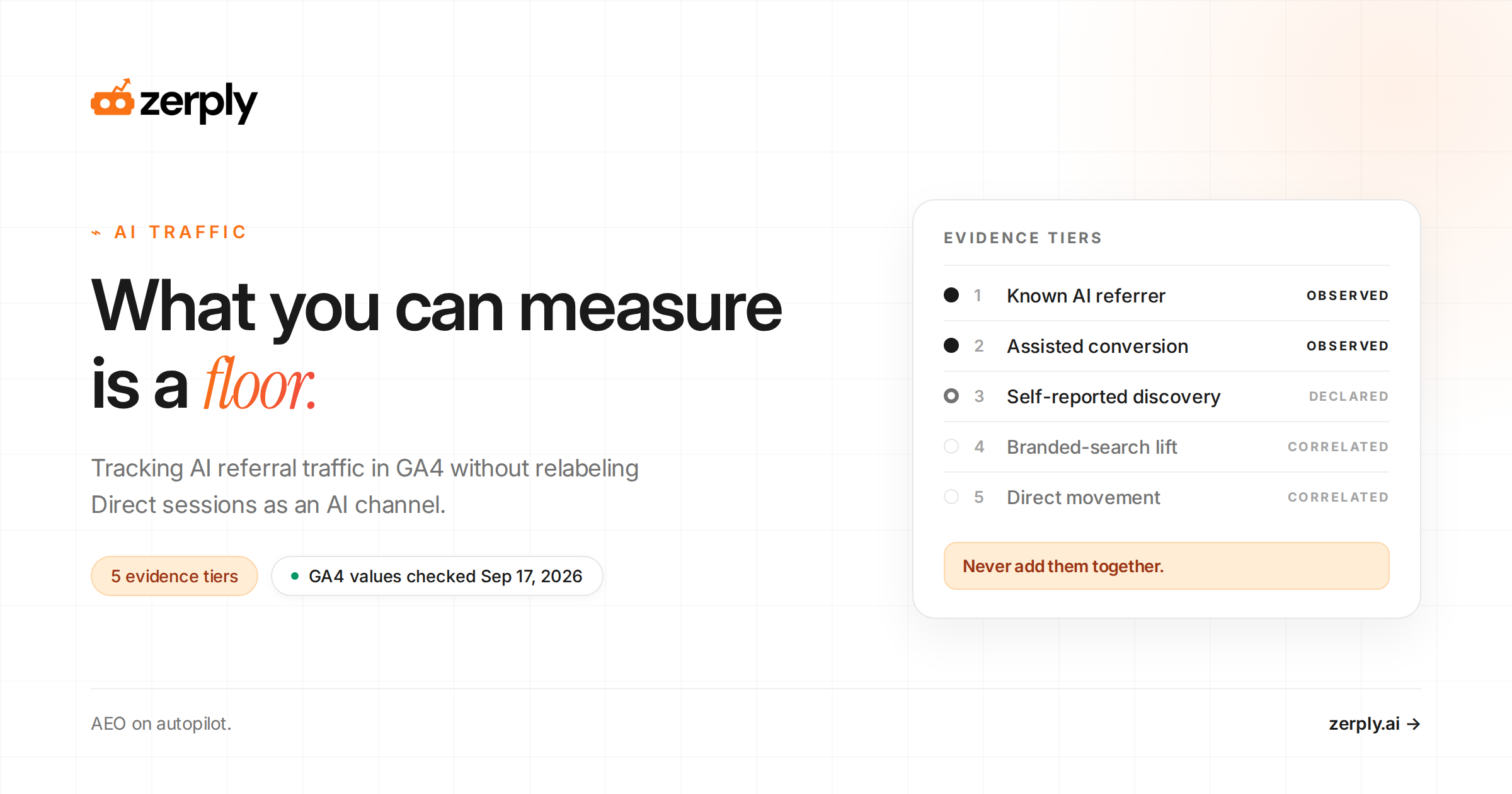
| Evidence tier | What it shows | How to capture | What it cannot prove |
|---|---|---|---|
| 1. Known AI referrer session | A recognized assistant source or platform-added UTM started a measured session | GA4 source, medium, landing page, and verified channel | Prompt, answer wording, untagged influence, or causation |
| 2. AI-referred assisted conversion | A known AI session occurred before a later key event | GA4 attribution reporting or a consented, identity-aware warehouse path | Influence outside the lookback window or unjoined cross-device journeys |
| 3. Self-reported AI discovery | A buyer remembers using an assistant during discovery | A controlled How did you hear about us? field with named AI choices and free text | Exact timing, prompt, cited page, or perfect recall |
| 4. Branded-search movement aligned with visibility | Brand demand changed during the same period as measured mentions or citations | Branded queries, a fixed prompt panel, and dated annotations | That AI visibility caused the movement |
| 5. Direct movement aligned with visibility | Unattributed sessions changed alongside measured AI visibility | Direct sessions by landing page and dated annotations | Which Direct sessions came from AI or whether the relationship is causal |
Use three confidence labels. Tiers one and two are directly observed, tier three is declared, and tiers four and five are correlated. Never add the tiers together. The same buyer can appear in more than one tier, so summing them produces double counting and an invented total-AI-traffic figure.
What does AI referral traffic actually tell you?
AI referral traffic tells you which assistant-linked sessions reached your site, which pages attracted those visits, and whether those visitors engaged or converted. It does not tell you the full volume of AI influence or the prompt that caused every visit.
Volume is the least useful signal. Begin with destination, intent, and outcome. Identify landing pages receiving known AI referrals and group them by type, such as documentation, educational content, comparisons, pricing, and product pages. A concentration on one page can reveal content assistants retrieve or an answer that gives users a reason to click.
Compare identifiable AI traffic with Organic Search and Referral using the same measures: sessions, engaged sessions, key events, session key-event rate, landing-page mix, and qualified leads or pipeline stages where analytics and CRM identities can be lawfully joined. Report raw counts beside rates. A high percentage from a handful of sessions is not a stable performance finding.
Do not claim AI referral traffic converts better than organic search as a category rule. Identifiable visitors are self-selected because they chose to leave an answer and visit the source. Intent, query, landing page, interface, and sample size all change outcomes.
Compare referred landing pages with the pages recorded as citations in your prompt-monitoring system. Cited-and-visited, cited-but-not-visited, visited-without-a-recorded-citation, and neither-cited-nor-visited are distinct patterns.
The comparison is a sample rather than proof, but it turns an acquisition report into a content diagnosis. If the goal is to convert visibility into demand, use the same diagnosis to turn LLM visibility into organic traffic and authority.
How do you act on the findings?
Act on AI referral traffic by mapping each pattern to one owner, one content or analytics change, and one validation metric. Assign every pattern to an owner and define its next validation step before changing content.
If competitors are being cited while your pages are absent, use a fixed prompt set to monitor competitor visibility in AI answer engines before prioritizing new content.
| Observation | Owner | Next action | Validation |
|---|---|---|---|
| One page receives a large share of identifiable referrals | Content lead | Inspect its cited passage, heading structure, evidence, format, and intent. Turn useful attributes into an editorial pattern. | Apply the pattern to related pages and monitor the same sources and prompt set. |
| Citations appear without referrals | SEO or AEO lead | Decide whether the answer fully satisfies the query. Add a reason to click only when users need depth, data, a tool, a template, or a next step. | Track citation persistence, branded demand, and self-reported discovery separately. |
| Crawler activity appears without citations | Technical SEO and content owner | Verify user-agent and network identity, confirm access to the intended URL, then review extractability and support for claims. | Confirm crawler access first; treat later citations as a separate event. |
| Referrals arrive but convert poorly | CRO or demand-generation owner | Compare the answer’s framing with the landing-page promise, first screen, CTA, and next step. | Segment key events by source and landing page using equivalent periods and raw counts. |
Zerply AI Traffic Analytics records bot requests at the infrastructure layer without requiring a page script and shows which URLs were requested. That supports crawler diagnosis, but it does not prove a citation, recommendation, or human visit.
For tooling evaluation, compare products using the AEO and GEO platform buying guide and the AI visibility tools comparison. Check whether a platform exposes raw answers and source URLs instead of relying only on a composite score.
Zerply’s Starter, Pro, and Business plans support one brand or domain; multi-brand tracking requires Enterprise. Account for that limit when evaluating an agency workflow across clients.
What should the stakeholder report include?
A good AI traffic report should fit on one page. Open with confirmed AI referral sessions, engaged sessions, key events, and the top landing pages. Label this section directly observed.
Then add a separate visibility section with the tracked prompts where the brand was mentioned, recommended, or cited. Label it answer evidence.
Finish with a correlated-demand section that shows branded-search movement, Direct landing-page movement, and any dated content, PR, or product changes that may explain the pattern.
Use a consistent reporting template:
| Report field | What to enter |
|---|---|
| Period | Complete date range, excluding partial days when possible |
| Verified source values | The exact AI-assistant sources included in the channel rule |
| Rule changes | Any hostname, regex, or channel-order edits made during the period |
| Directly observed results | Sessions, engaged sessions, key events, top landing pages, and conversion rate from verified AI sources |
| Answer evidence | Prompts where the brand was mentioned, recommended, or cited, plus cited URLs |
| Correlated demand | Branded-search movement, Direct landing-page movement, and annotated launches or campaigns |
| Decision | The action owner, next change, and validation metric |
Do not merge those sections into one total. Instead, write a plain-language interpretation, such as: “Verified assistant referrals increased on three educational pages, the same pages were cited in Perplexity and ChatGPT Search, and branded searches rose during the period.
This supports updating related comparison pages, but it does not prove that AI answers caused all branded demand.” That sentence is more useful than a large blended number because it tells the team what to do and what not to claim.
For recurring reporting, keep the fields stable: period, source values included, rule changes, top landing pages, sessions, engaged sessions, key events, citation status, prompt set, competitor notes, and next action. Stability is what lets the team separate a real change from a measurement change.
Measure the floor, then make a decision
Known AI referral sessions provide a defensible minimum, not a complete measure of AI influence. The minimum is still decision-useful when source rules, denominators, and attribution limits are documented.
Use the evidence tiers to decide whether to fix channel classification, investigate why a page earns citations, align a landing page with the answer that sends visitors, or expand answer and citation monitoring. Measure confirmed AI referral traffic as the floor, then use visibility and citation evidence to decide what deserves action.
Start a Zerply trial to evaluate referral evidence and AI visibility against the same fixed framework.
See how your brand shows up in AI search
Track visibility, citations, prompts, and competitors across leading AI platforms.
Frequently asked questions
How do you track traffic from ChatGPT?
Open GA4 Traffic acquisition, inspect the AI Assistant row, then add Session source and medium. Look for chatgpt.com and compare it with Referral and Unassigned. If verified ChatGPT values are fragmented, place the hostname in a narrow custom-channel rule above Referral.
Where does Google Analytics ChatGPT traffic appear?
Recognized visits can appear as chatgpt.com / ai-assistant in GA4’s AI Assistant channel. Other identifiable visits may appear under Referral or another medium. If no clear source reaches GA4, the visit can be classified as Direct and cannot safely be relabeled as ChatGPT traffic.
Can Google AI Mode referral traffic be isolated in GA4?
Not reliably with a unique GA4 referrer rule. Google assigns AI Mode and AI Overview visits to Organic Search and excludes them from the AI Assistant channel. Treat GA4 sessions as part of Google organic traffic and use supported Search Console reporting for feature visibility.
Why does AI traffic appear as Direct or dark traffic?
GA4 uses Direct when it receives no clear referral or campaign source. Referrer policies, redirects, copied URLs, offline documents, and tracking interference can remove attribution information. Direct is therefore a mixed category that may include AI-influenced visits but cannot be treated as an AI channel.
How do you calculate AI traffic conversion rate?
Divide key events or qualified conversions attributed to verified AI referral sessions by those sessions, then multiply by 100. Report the numerator and denominator alongside the rate, compare equivalent periods and landing pages, and do not assume the result represents untracked AI influence or a universal benchmark.
Do UTMs work for AI search referral traffic?
UTMs work when the platform adds them or when you control the link, such as in owned distribution or partner placements. They do not let publishers tag citations independently generated by AI assistants, and copied tagged links identify link lineage rather than always proving the immediate click surface.
Written by
Founder at Zerply.ai & Wittypen
Anshul is the founder of Zerply.ai and previously built Wittypen, a content marketplace powering SEO growth for 1,000+ businesses. Over the last decade he has worked hands-on with B2B SaaS and tech teams to turn search data into compounding organic growth. At Zerply he shares practical playbooks on AEO, AI visibility, and modern SEO that come directly from experiments, wins, and failures in real projects.